
Plugin directory / Developer / plugin-registry
plugin-registry
Verified · install-tested on dsh vlln
What it does
DSH plugin registry infra: browser panel for official repository plugins
Works — verified, growing community
DSH plugin registry infra: browser panel for official repository plugins It installs cleanly and boots without issues in our testing. It has a growing community — a solid choice.
“Verified” means our automated CI actually ran dsh plugin add in a clean profile and it booted — nothing more. Feature descriptions and version compatibility are the author’s claims. This is not a security audit and not an endorsement of third-party code.
README
plugin-registry
中文 | English
DSH plugin ecosystem infrastructure: thin console + official plugin development guide
Browser panel managing a profile's plugin install state (bundle layer stack + insert rows + enable/disable), zero patches;
the `make-dsh-plugin` skill guides developers in writing official-format plugins.

Pivot (2026-08): Official 0809 added a repository plugin mechanism (
.dsh-plugin) covering ~95% of the old mechanism; this repo is now a
thin console + plugin development spec and guidance (old patches/CLI/panel removed). Since 0811 the repository-plugins mechanism is gone
(vendor/loader/src/repository.ts); external plugins install via the web profile only: bundles (dsh.bundle) joindsh.profile.bundles;
non-bundles (plain cordis packages) mount via insert rows incordis.patch.yml(live via HMR). Full assessment: official 0809 coverage.
Positioning
DeepSeek Harness's official mechanisms define "what a plugin is and how it runs"; this repository adds two things (panel structure: console README; guidance: below):
- Thin console (
packages/plugin/console) — browser panel managing a profile's plugin install state + 4 agent tools - Development spec and guidance —
make-dsh-pluginskill + cookbook for creating official bundle/cordis plugins
Ecosystem relationships (who can do what)
Official DSH (DeepSeek Harness)      plugin runtime + profile bundle mechanism (no repo mechanism since 0811)
   │
   ├── Official plugins (bundle)     loop / task-status / navbar etc. — `dsh plugin --profile web add` install into profile layer stack
   ├── Third-party plugins (bundle/plain)  standalone GitHub repos or npm packages — bundles enter the layer stack; plain plugins use insert rows (live)
   │
   └── This repository (plugin-registry)  ① thin console: browser panel + agent tools for install-state management
                                         ② make-dsh-plugin skill + cookbook: guides third-party plugin development
Plugin forms and install paths: plugin type comparison; install examples: examples.
Thin console
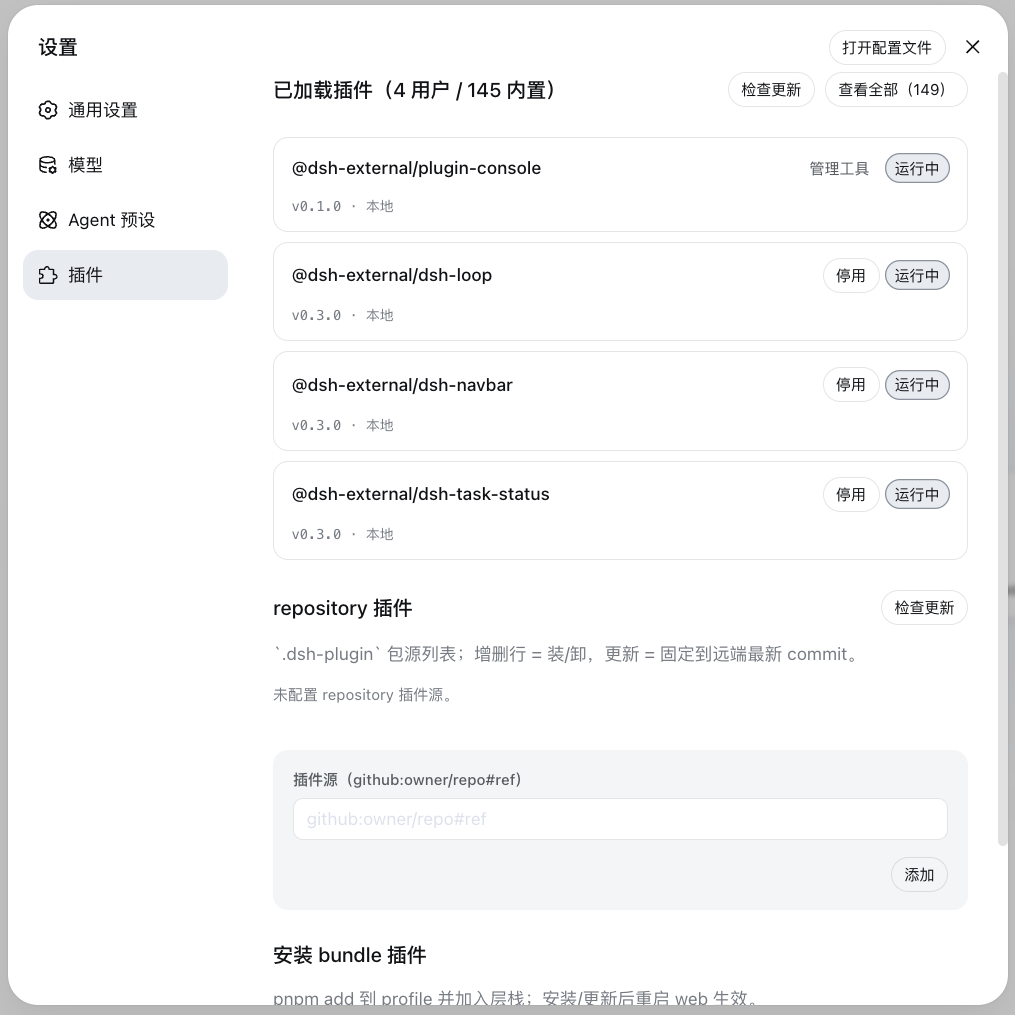
The settings page's "Plugin Management" panel manages a profile's plugin install state: install area (single entry — npm package name or GitHub project (https://github.com/o/r / github.com/o/r / github:o/r, URL auto-normalized) — automatic pnpm add; bundles enter the layer stack, non-bundles get insert rows) + loaded area (version check/update, disabled toggle, bundle uninstall).
Installation
Option 1: git source, direct install (recommended, one line)
dsh plugin --profile web add "github:vlln/plugin-registry#path:/packages/plugin/console"
Build artifacts are committed (git source skips the build); one command installs directly (~15 s).
Windows note: this uses the
#path:form (no&) on purpose — on win32dsh pluginforwards
args through cmd.exe, where&is a command separator, so#main&path:...gets split and fails
withERR_PNPM_INVALID_DEPENDENCY_NAME.#path:resolves the default branch (main) HEAD; the
branch-pinned#main&path:...only works on POSIX shells.
Option 2: npm source
dsh plugin --profile web add @vlln/[email protected]
Option 3: local directory (source available)
git clone https://github.com/vlln/plugin-registry
cd plugin-registry/packages/plugin/console
dsh plugin --profile web add .   # artifacts are committed, no build needed; the current dir is the bundle package dir (dsh anchors . to an absolute path)
Refresh the web page after mounting — the "Plugin Management" panel appears on the settings page.
Agent Skills
| Skill | Purpose |
|---|---|
| make-dsh-plugin | Create official bundle / cordis plugins: pick a form (skill package / MCP / Node tool / with UI) → declare dsh.bundle or plain apply → install-and-verify discipline. Details in references/; reference implementation: packages/plugin/console |
Before you start developing (pitfalls we've hit)
Key pitfalls (official packages not yet published, Node-half changes need a restart, host CSS overrides, etc.) and the full list: skill references/gotchas — read before developing.
Documentation
- Plugin type comparison — bundle vs plain cordis plugins: development/distribution/installation/management dimensions + how to choose
- Official 0809 coverage assessment — official mechanism coverage, pivot decision (0811 repository removal: CHANGELOG)
- Thin console design — design of unified installation-state management
- Historical mechanism docs (archived after the pivot): architecture (old), creating a plugin (old), manifest format (old), creating a repository-plugin (old), etc.
- Changelog / Roadmap
License
MIT License. See LICENSE.
Install
Install the catalog once, then DeepSeek Harness can find and install any plugin from this site automatically:
dsh plugin add dshbase-catalogThen say "install plugin-registry for me" — your agent finds it in the directory and installs it. Docs: dshbase-catalog · verified packs.
Web profile:
dsh plugin --profile web add plugin-registryHeadless (CLI) profile:
dsh plugin --profile headless add plugin-registryPackage
npm: plugin-registry · version — · tested on dsh 0.1.0-rc.6
Test report
Verified end-to-end: L1 install + L2 load + L3 runtime Q&A on dsh 0.1.0-rc.6.
When to use it
Extend the agent's coding surface — give it a new tool, workflow, or integration so it handles a dev task it couldn't before.
Who it's for
Developers who want dsh to behave like a teammate on real codebases — editing, running, and verifying changes rather than just answering.
For developers — extending it
The tool/command surface is the seam: expose more of the SDK, add smarter context wiring, or tighten the loop between code changes and verification.
Share this badge
Drop this badge into your README — it links back here and updates automatically when our test status changes:

[](https://dshbase.com/plugins/plugin-registry/)<a href="https://dshbase.com/plugins/plugin-registry/"><img src="https://dshbase.com/badges/plugin-registry.svg" alt="dshbase install-tested"></a>