
Plugin directory / Productivity / @stmol/dsh-rub-cost
@stmol/dsh-rub-cost
Verified · install-tested on dsh Stmol
What it does
DSH plugin: session cost in RUB in the conversation dock
Works — verified, early-stage project
DSH plugin: session cost in RUB in the conversation dock It installs cleanly and boots without issues in our testing. It's early-stage but functional.
“Verified” means our automated CI actually ran dsh plugin add in a clean profile and it booted — nothing more. Feature descriptions and version compatibility are the author’s claims. This is not a security audit and not an endorsement of third-party code.
README
dsh-rub-cost
A DeepSeek Harness plugin: it shows the cost of the current session in rubles in
the conversation dock, next to the built-in token counters
(conversation.composer.dock).
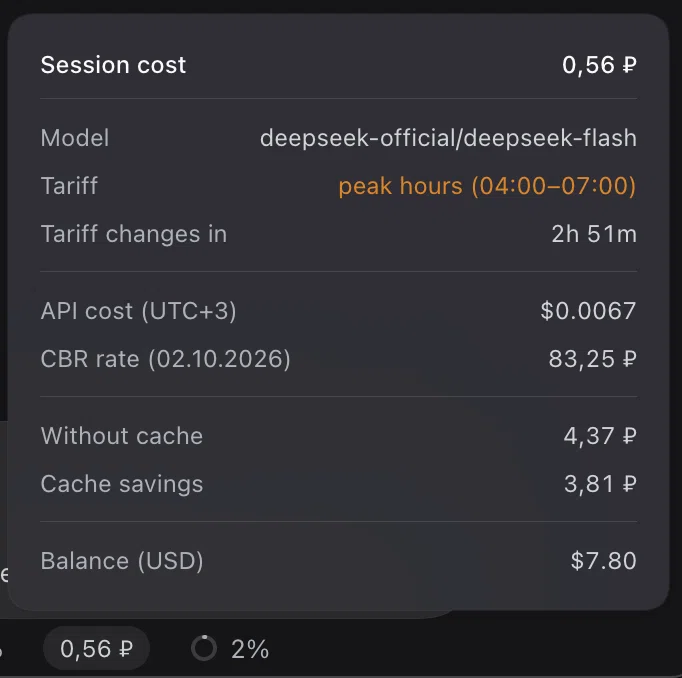
The capture above still shows the former "API cost" row, which the card replaced
with the price list; swap in a fresh screenshot the next time the card is opened.
The pill is a button. Clicking it opens a card styled after the built-in "Token
usage" popover; a second click, a click outside the card, or Escape closes it.
Installation
Published on npm as @stmol/dsh-rub-cost.
Any DSH bundle source works: an npm package, a Git repository, a tarball, or a
local folder.
- GUI: Settings → Plugins → Add plugin, then
@stmol/dsh-rub-cost, or the
repository address. - CLI:
dsh plugin add @stmol/dsh-rub-cost.
The install name is the name field in package.json; the name incordis.patch.yml and the factory id in client.js have to match it, or the
bundle will not build. There are no automatic updates: remove the plugin and add
it again. The plugin runs with your own privileges.
What the card shows
Model, the current tariff and the countdown to its switch, the API price list in
dollars per 1M output tokens at the tariff in effect,
the CBR rate with its publication date, the cost of the session including
subagents, the same session without a cache and the savings, and the DeepSeek
Platform wallet balances. The session cost itself is the ruble amount on the pill
and in the card header; the card does not repeat it in dollars.
Every ruble amount is shown with two decimals. The price list also keeps two and
adds a third or fourth digit when needed to preserve a finer rate. The token breakdown stays out of the
card, because the neighbouring "Token usage" cell already prints it.
Peak hours cost twice the off-peak rate. The tariff row names only the window in
effect, for example peak hours (04:00-07:00) highlighted in amber, oroff-peak. Peak hours are Beijing weekdays 09:00-12:00 and 14:00-18:00, printed
in your browser's timezone — 04:00-07:00 and 09:00-13:00 at UTC+3, and the same
windows shifted by your own offset; weekends are off-peak around the
clock. The tariff itself is never computed in your zone: the rule stays in
Beijing time, and only the printed clock moves, so the amount is the same
wherever the card is opened. The countdown follows from that rule alone, so on a
Friday it runs into the next week: 63h 00m just after 13:00 MSK, 61h 47m at
14:13 MSK. The rule assumes the following Monday is an ordinary working day; a
PRC holiday moves the real switch, as the first limitation below explains.
How it is computed
cost = (uncachedInput + cacheWrite) × cacheMiss + cacheRead × cacheHit + output × output
Tokens are priced with DeepSeek's official dollar list per 1M tokens, then
converted at the CBR USD/RUB rate. The account is billed in dollars, so the
dollar list is the basis; the yuan list on the Chinese documentation page is the
same list at the fixed 20/3 ¥/$ rate. A usage report can show amounts in CNY
while a granted yuan balance is being spent, which is that same list again.
Tokens come from the host tokenUsage projection and the model frommodelSelection.lastUsed; the plugin never folds the session journal itself. The
price rows print the same model's MODEL_PRICES entry for the tariff in effect,
so they move only when the tariff or the model does. The rate comes from a mirror
of the CBR rates and is cached in localStorage: with no network the last known
rate is used, and with no cache the cell shows a dash and the reason in the
tooltip.
The pill and the card header are a running total: the cost of the current session,
not of the account and not a per-request price. Subagents are priced from their
own route and summed into a separate "Total with subagents" row; while the card is
open their spend is polled every 15 seconds. If even one child cannot be read, that
row is hidden rather than shown incomplete.
Known limitations
- PRC statutory holidays are not modelled. The plugin keeps one year-agnostic
rule — Beijing weekday plus peak window — so it needs no annual edit, and a
holiday weekday is therefore priced as a peak day. DeepSeek bills those days at
the off-peak rate, so on such a day the amount and the countdown are both too
high until the holiday is over. The official dates live in the State Council
notice published every November, which is the only source; the client bundle
ships no year-specific table on purpose. - The ruble total is not a sum of per-request bills: the whole session is repriced
at the tariff in effect when the card renders, so a peak/off-peak switch doubles
or halves the amount without a single new token. The tariff and the price rows
name what is in effect, which is exactly what the countdown counts down to. tokenUsageholds a whole-session total with no per-route split, so after a
mid-session model change everything is estimated with the last used model.- Cache writes are billed at the cache miss rate: DeepSeek publishes no separate
price, and on DeepSeek routes that counter is zero anyway. - Subagents use their own last used model at the current tariff, and a child that
has not chosen a route yet falls back to the parent's. - The balance request pins
x-client-version. The version is hardcoded inclient.jsand has to be updated by hand after a DSH upgrade. - The clock zone comes from the browser, not from the DeepSeek account: the
account profile (remote.account.getProfile) exposes no timezone. When the
browser reports no zone at all, the card falls back toDEFAULT_OFFSET_MS
(UTC+3).
Editing prices and the rate
MODEL_PRICES, BILLING_CURRENCY and RATE_URL sit at the top of client.js;DEFAULT_OFFSET_MS next to them is the fallback clock offset (UTC+3) for a
browser that reports none. After an edit the bundle has to be reinstalled: remove
and add the plugin in the UI, or dsh plugin add <path-to-plugin-directory>.
License
MIT, see LICENSE.
Install
Install the catalog once, then DeepSeek Harness can find and install any plugin from this site automatically:
dsh plugin add dshbase-catalogThen say "install @stmol/dsh-rub-cost for me" — your agent finds it in the directory and installs it. Docs: dshbase-catalog · verified packs.
Web profile:
dsh plugin --profile web add @stmol/dsh-rub-costHeadless (CLI) profile:
dsh plugin --profile headless add @stmol/dsh-rub-costPackage
npm: @stmol/dsh-rub-cost · version 1.2.0 · tested on dsh 0.1.0-rc.6
Test report
Verified end-to-end: L1 install + L2 load + L3 runtime Q&A on dsh 0.1.0-rc.6.
Share this badge
Drop this badge into your README — it links back here and updates automatically when our test status changes:

[](https://dshbase.com/plugins/stmol-dsh-rub-cost/)<a href="https://dshbase.com/plugins/stmol-dsh-rub-cost/"><img src="https://dshbase.com/badges/stmol-dsh-rub-cost.svg" alt="dshbase install-tested"></a>