
插件目录 / UI & Skins / dsh-eva-theme-plugin
dsh-eva-theme-plugin
已验证 · 实测可装 oceanxuikun
功能简介
EVA主题插件,含初号机、二号机等主题
可用 — 实测通过,早期项目
EVA主题插件,含初号机、二号机等主题 实测能干净安装、正常启动。早期项目,但功能可用。
「已验证」表示我们的自动化 CI 在干净 profile 里实际执行了 dsh plugin add 并启动成功——仅此而已。功能描述与版本兼容性均为作者声明。这不是安全审计,也不代表对第三方代码的背书。
README
dsh-eva-theme-plugin
English | 中文
A user-level client plugin that gives the DeepSeek Harness Web GUI three
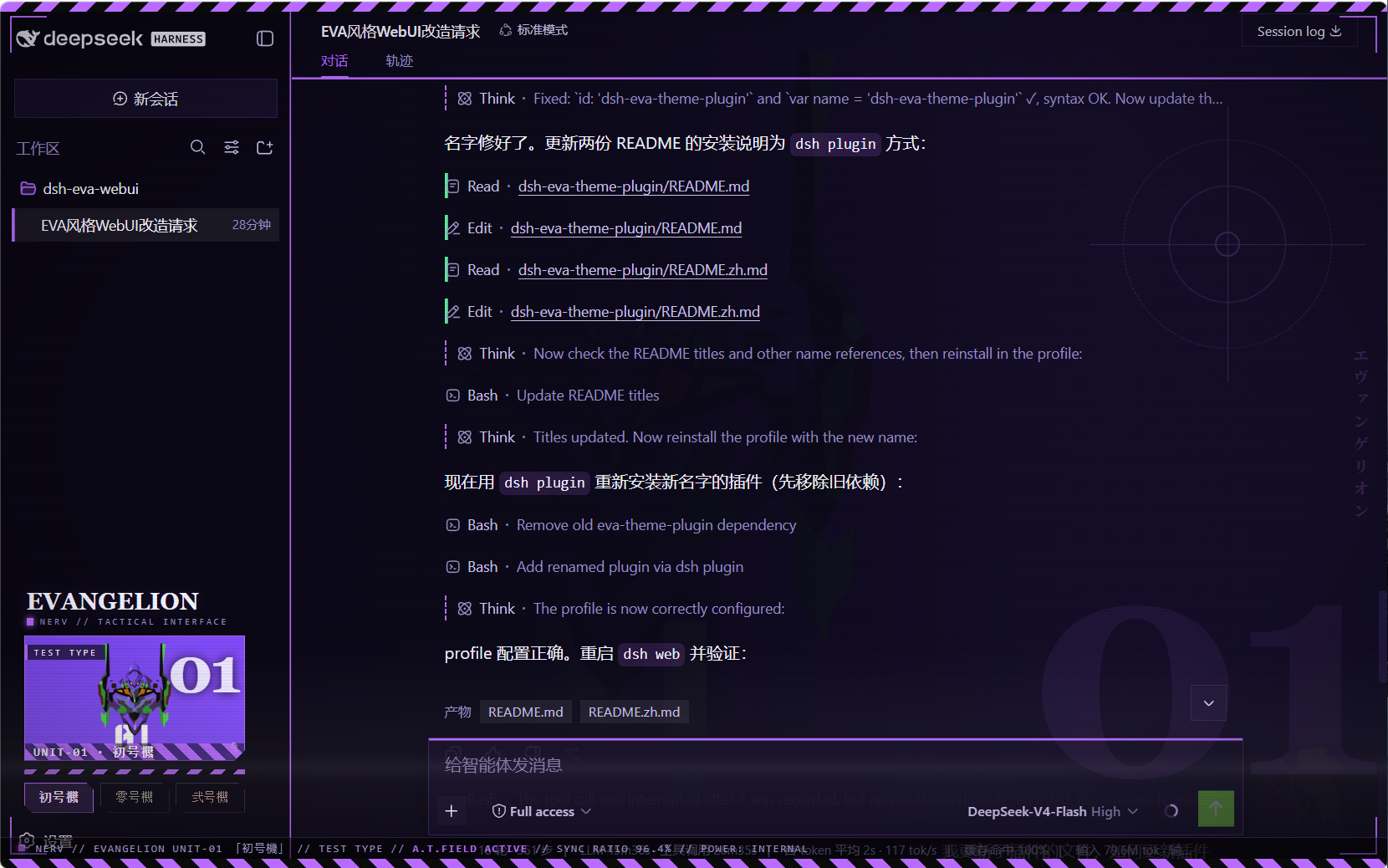
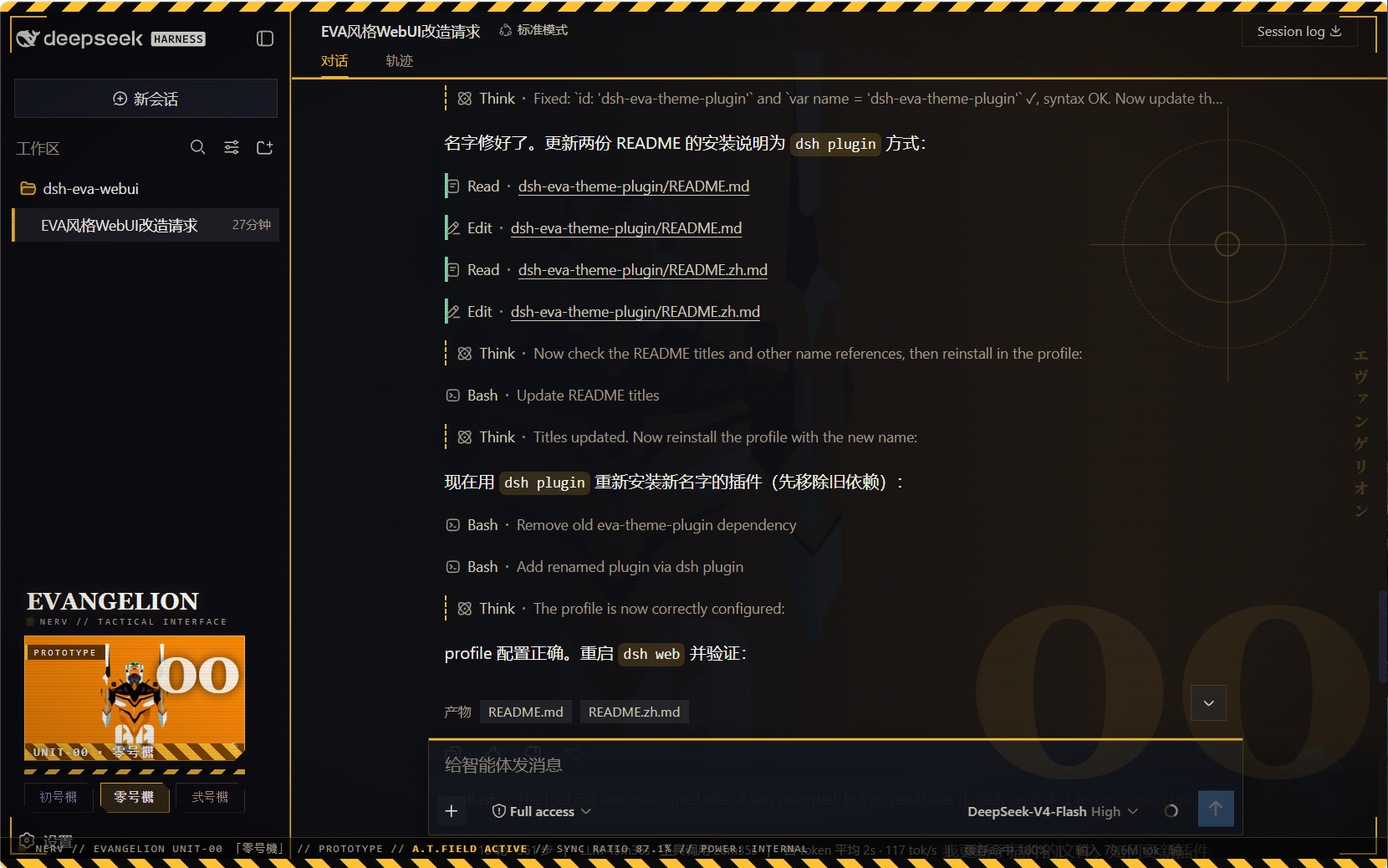
Neon Genesis Evangelion unit schemes — 初号機 (Unit-01), 零号機
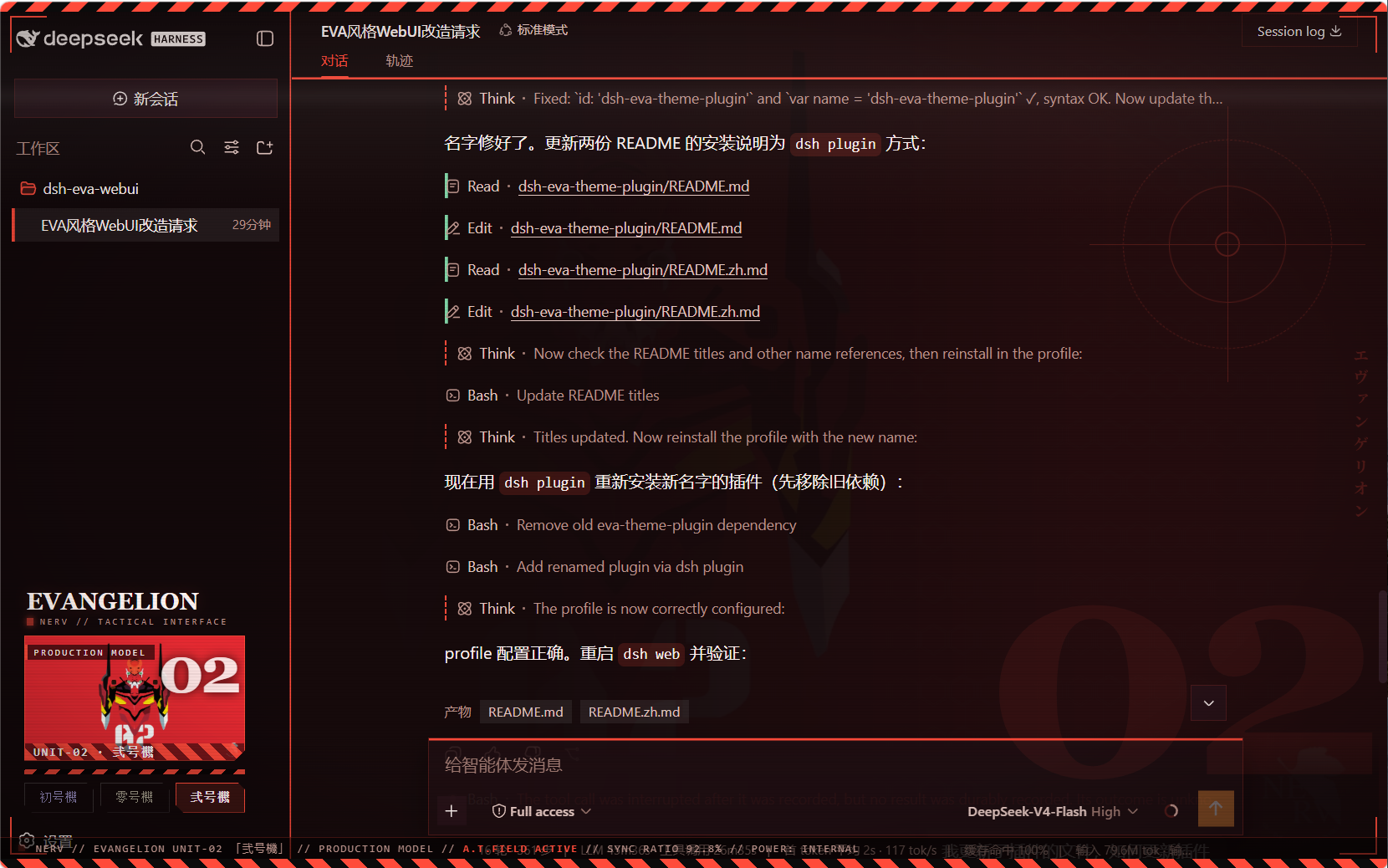
(Unit-00), 弐号機 (Unit-02) — each retinting every page element and
showing the active unit's art in the sidebar. Built entirely as a plugin:
no harness source is touched.
What it does
- Three switchable schemes, all dark, each with a complete
--dsw-*
token set (86 tokens) so all elements re-tint on switch — surfaces,
labels, buttons, states, bubbles, input bar, sidebar, scrollbars, code
blocks, menus:eva-unit01初号機 — purple body (#b96bff) with neon-green accentseva-unit00零号機 — blue-grey body, yellow accents (#ffc233)eva-unit02弐号機 — crimson body, orange accents (#ff4b3a)
- Unit wallpaper backdrop per scheme (embedded data URIs; wallhaven
fan art, no baked-in text/watermarks), painted right of center behind the
app with a left-side protection gradient so the chat column stays legible
while the artwork shows through the translucent panels. - Sidebar switcher (wide): a mecha art banner for the active unit plus
three unit buttons, injected into the sidebar'ssidebar.footer.action
slot; collapsed rail mode shows three unit dots. - EVA is the enforced look: on every
theme/changethe plugin re-asserts
Unit-01 whenever the active theme is not one of the three unit schemes
(this also absorbs the async settings-adopt that would otherwise reset the
theme to light/dark at boot). The three unit buttons are the theme control. - Mecha chrome (token-driven, re-tints per unit):
- hazard warning stripes across the top edge of the viewport
- HUD targeting brackets at the four viewport corners
- subtle scanline + vignette overlay (mecha monitor feel)
- blueprint grid in the backdrop (visible through the translucent panels)
- square mecha corners on the composer card + brand-colored top edge,
brand-glow header underline, brand edge on the sidebar - sidebar switcher: chamfered (angle-cut) unit buttons, monospace
letter-spaced labels, hazard-stripe strip +UNIT-0Xdesignation on the
art banner
Screenshots
初号機 (Unit-01)
零号機 (Unit-00)
弐号機 (Unit-02)
Files
| Path | Role |
|---|---|
package.json |
package identity + dsh.client declaration + exports |
lib/index.js |
host half (no-op) |
client.js |
browser bundle: theme registry + backdrop + sidebar switcher |
client.template.js |
readable bundle source (base64 placeholders) |
assets/unit00.webp · unit01.webp · unit02.webp |
embedded artwork (webp) |
assets/screenshot00.png · screenshot01.png · screenshot02.png |
effect preview screenshots (Unit-00/01/02) |
Installation (via dsh plugin)
The package is a profile bundle (dsh.bundle.patch), so it installs with
the standard plugin command — no manual symlinks or patch edits:
# Run from the harness repository:
pnpm dsh plugin --profile web add https://github.com/oceanxuikun/dsh-eva-theme-plugin.git
This runs pnpm add in the web profile, links the package into~/.dsh/profiles/web/node_modules, and automatically appendsdsh-eva-theme-plugin to dsh.profile.bundles in the profile'spackage.json. Restart dsh web, then refresh the page.
Rebuild after changing images or the template:
pnpm run build # regenerates client.js from client.template.js + assets/
Uninstall
pnpm dsh plugin --profile web remove dsh-eva-theme-plugin
Then restart dsh web and refresh.
Credits
Artwork: fan art hosted on wallhaven.cc (see sources above), used as local
personal GUI backgrounds; Neon Genesis Evangelion © Khara / GAINAX.
安装
装一次目录插件,之后本站所有插件都能让 DeepSeek Harness 自动找、自动装:
dsh plugin add dshbase-catalog然后对 agent 说「帮我装 dsh-eva-theme-plugin」,它会在目录里找到并自动安装。文档:dshbase-catalog · 已验证场景包。
该插件是 GitHub 源码(未发 npm)——直接从仓库装:
Web profile:
dsh plugin --profile web add github:oceanxuikun/dsh-eva-theme-pluginHeadless(CLI)profile:
dsh plugin --profile headless add github:oceanxuikun/dsh-eva-theme-plugin实测报告
验证通过:从 GitHub 源码完成 L1 安装 + L2 加载 + L3 运行(dsh 0.1.0-rc.6)。
使用场景
改变 dsh 的外观或交互方式——一套主题、皮肤或新面板,重塑工作区。
适合谁
在 web UI 里一待几小时、想让它按自己的习惯好看又好用的人。
二次开发建议
皮肤、面板和主题 token 是扩展点——写新皮肤、加面板,或与上游配色同步 token。
分享徽章
把这枚徽章粘进 README——它会链回本页,实测状态变化时自动更新:

[](https://dshbase.com/zh/plugins/dsh-eva-theme-plugin/)<a href="https://dshbase.com/zh/plugins/dsh-eva-theme-plugin/"><img src="https://dshbase.com/badges/dsh-eva-theme-plugin.svg" alt="dshbase 实测可装"></a>