
Plugin directory / UI & Skins / dsh-eva-theme-plugin
dsh-eva-theme-plugin
Verified · install-tested on dsh oceanxuikun
What it does
Evangelion-inspired theme plugin for DSH WebUI, featuring Unit-00, Unit-01, and Unit-02 themes with immersive backgrounds and mecha-style U…
Works — verified, early-stage project
Evangelion-inspired theme plugin for DSH WebUI, featuring Unit-00, Unit-01, and Unit-02 themes with immersive backgrounds and mecha-style U… It installs cleanly and boots without issues in our testing. It's early-stage but functional.
“Verified” means our automated CI actually ran dsh plugin add in a clean profile and it booted — nothing more. Feature descriptions and version compatibility are the author’s claims. This is not a security audit and not an endorsement of third-party code.
README
dsh-eva-theme-plugin
English | 中文
A user-level client plugin that gives the DeepSeek Harness Web GUI three
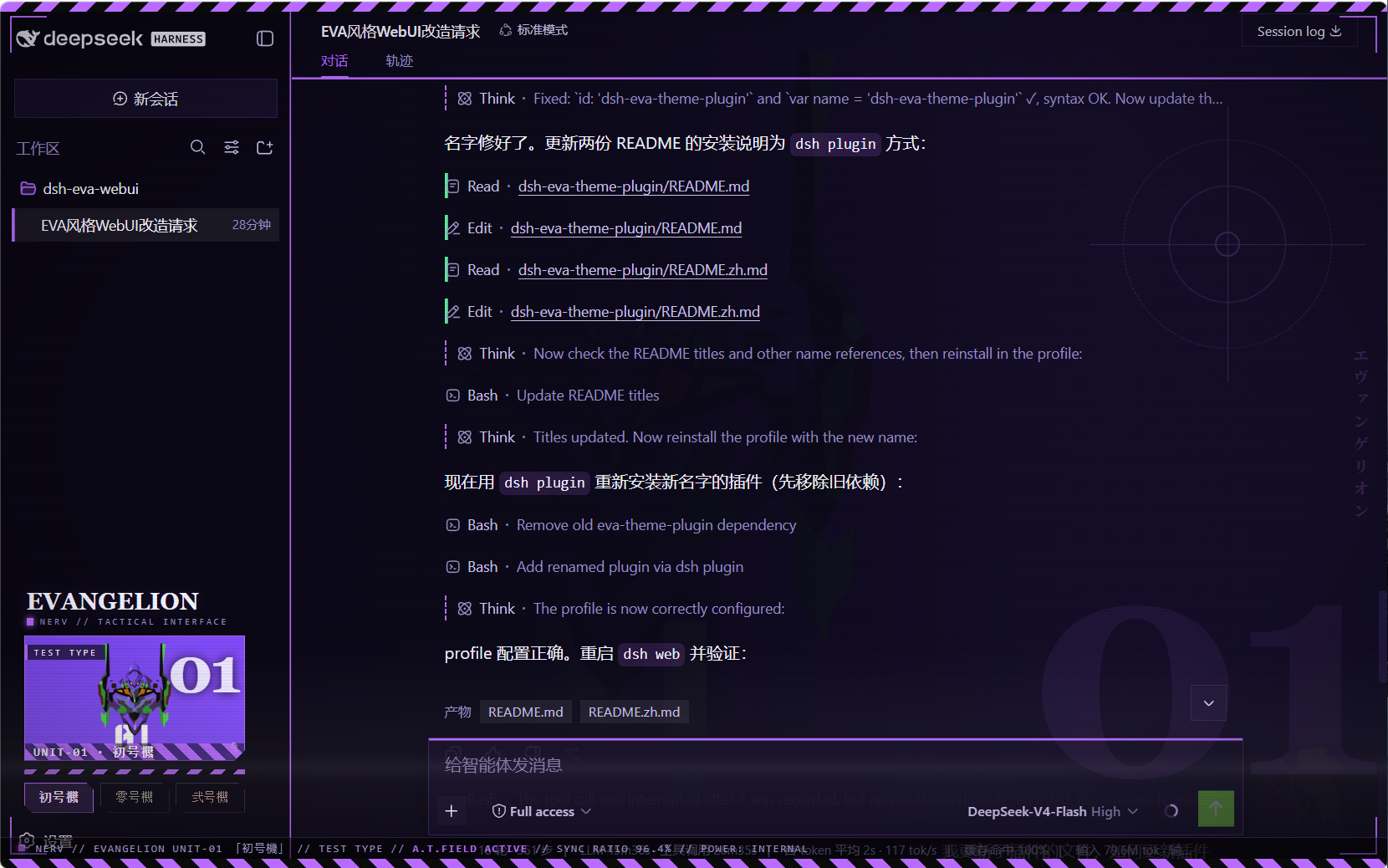
Neon Genesis Evangelion unit schemes — 初号機 (Unit-01), 零号機
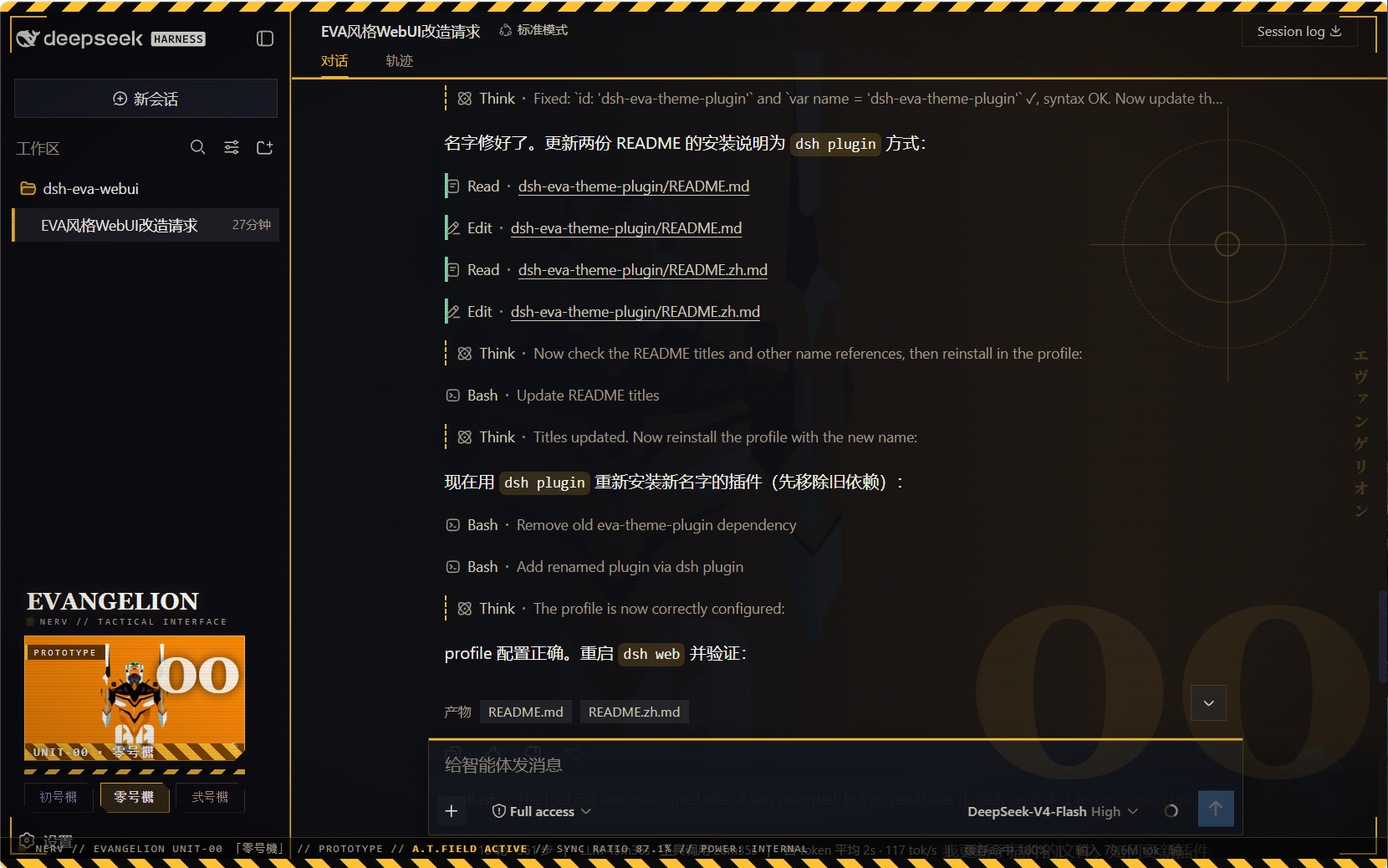
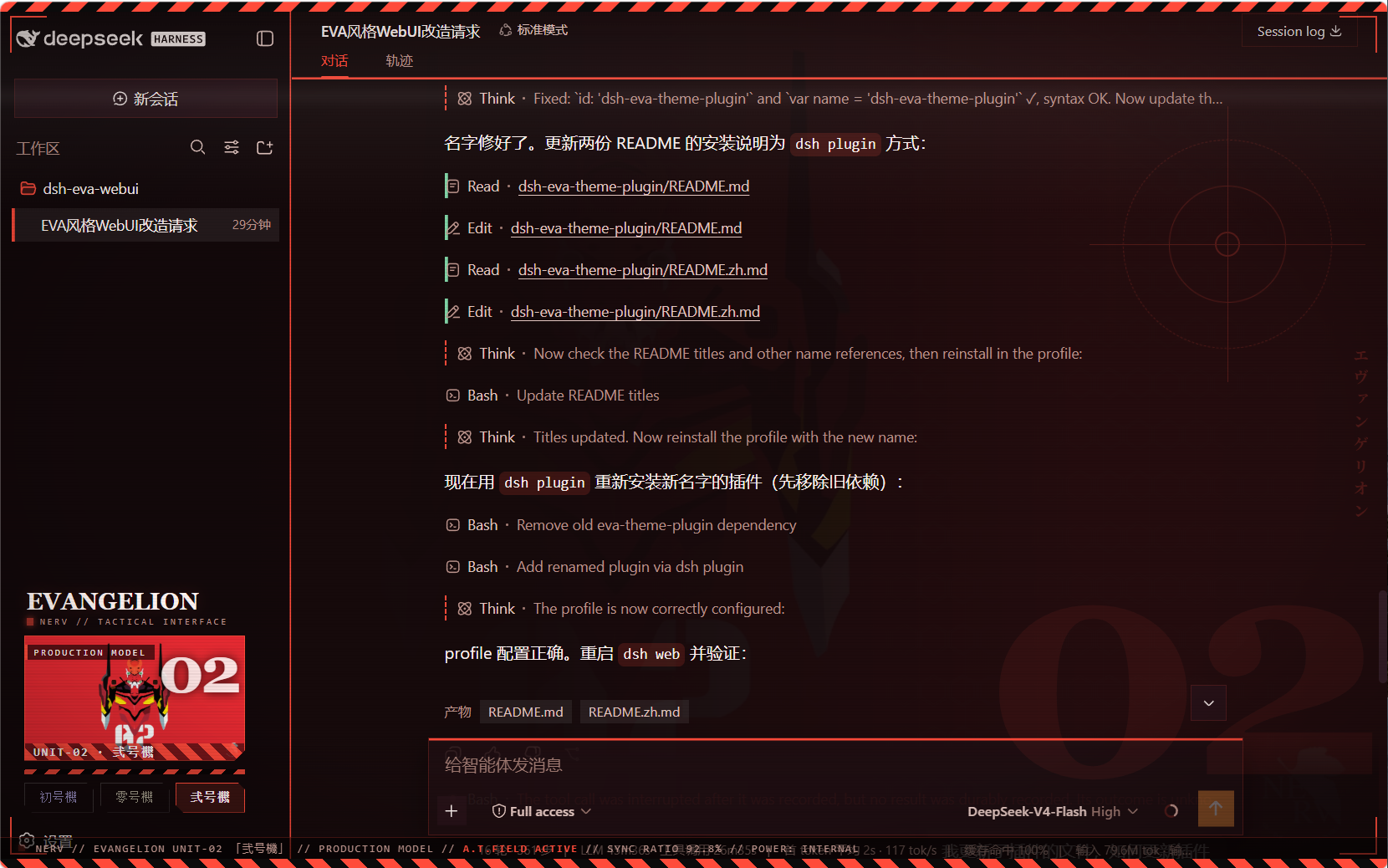
(Unit-00), 弐号機 (Unit-02) — each retinting every page element and
showing the active unit's art in the sidebar. Built entirely as a plugin:
no harness source is touched.
What it does
- Three switchable schemes, all dark, each with a complete
--dsw-*
token set (86 tokens) so all elements re-tint on switch — surfaces,
labels, buttons, states, bubbles, input bar, sidebar, scrollbars, code
blocks, menus:eva-unit01初号機 — purple body (#b96bff) with neon-green accentseva-unit00零号機 — blue-grey body, yellow accents (#ffc233)eva-unit02弐号機 — crimson body, orange accents (#ff4b3a)
- Unit wallpaper backdrop per scheme (embedded data URIs; wallhaven
fan art, no baked-in text/watermarks), painted right of center behind the
app with a left-side protection gradient so the chat column stays legible
while the artwork shows through the translucent panels. - Sidebar switcher (wide): a mecha art banner for the active unit plus
three unit buttons, injected into the sidebar'ssidebar.footer.action
slot; collapsed rail mode shows three unit dots. - EVA is the enforced look: on every
theme/changethe plugin re-asserts
Unit-01 whenever the active theme is not one of the three unit schemes
(this also absorbs the async settings-adopt that would otherwise reset the
theme to light/dark at boot). The three unit buttons are the theme control. - Mecha chrome (token-driven, re-tints per unit):
- hazard warning stripes across the top edge of the viewport
- HUD targeting brackets at the four viewport corners
- subtle scanline + vignette overlay (mecha monitor feel)
- blueprint grid in the backdrop (visible through the translucent panels)
- square mecha corners on the composer card + brand-colored top edge,
brand-glow header underline, brand edge on the sidebar - sidebar switcher: chamfered (angle-cut) unit buttons, monospace
letter-spaced labels, hazard-stripe strip +UNIT-0Xdesignation on the
art banner
Screenshots
初号機 (Unit-01)
零号機 (Unit-00)
弐号機 (Unit-02)
Files
| Path | Role |
|---|---|
package.json |
package identity + dsh.client declaration + exports |
lib/index.js |
host half (no-op) |
client.js |
browser bundle: theme registry + backdrop + sidebar switcher |
client.template.js |
readable bundle source (base64 placeholders) |
assets/unit00.webp · unit01.webp · unit02.webp |
embedded artwork (webp) |
assets/screenshot00.png · screenshot01.png · screenshot02.png |
effect preview screenshots (Unit-00/01/02) |
Installation (via dsh plugin)
The package is a profile bundle (dsh.bundle.patch), so it installs with
the standard plugin command — no manual symlinks or patch edits:
# Run from the harness repository:
pnpm dsh plugin --profile web add https://github.com/oceanxuikun/dsh-eva-theme-plugin.git
This runs pnpm add in the web profile, links the package into~/.dsh/profiles/web/node_modules, and automatically appendsdsh-eva-theme-plugin to dsh.profile.bundles in the profile'spackage.json. Restart dsh web, then refresh the page.
Rebuild after changing images or the template:
pnpm run build # regenerates client.js from client.template.js + assets/
Uninstall
pnpm dsh plugin --profile web remove dsh-eva-theme-plugin
Then restart dsh web and refresh.
Credits
Artwork: fan art hosted on wallhaven.cc (see sources above), used as local
personal GUI backgrounds; Neon Genesis Evangelion © Khara / GAINAX.
Install
Install the catalog once, then DeepSeek Harness can find and install any plugin from this site automatically:
dsh plugin add dshbase-catalogThen say "install dsh-eva-theme-plugin for me" — your agent finds it in the directory and installs it. Docs: dshbase-catalog · verified packs.
This plugin is GitHub source (not published to npm) — install it straight from the repo:
Web profile:
dsh plugin --profile web add github:oceanxuikun/dsh-eva-theme-pluginHeadless (CLI) profile:
dsh plugin --profile headless add github:oceanxuikun/dsh-eva-theme-pluginTest report
Verified: L1 install + L2 load + L3 runtime from GitHub source on dsh 0.1.0-rc.6.
When to use it
Change how dsh looks or how you interact with it — a theme, a skin, or a new panel that reshapes the workspace.
Who it's for
Users who spend hours in the web UI and want it to look and feel the way they work.
For developers — extending it
Skins, panels, and theme tokens are the extension points — author a new skin, add a panel, or sync tokens with an upstream palette.
Share this badge
Drop this badge into your README — it links back here and updates automatically when our test status changes:

[](https://dshbase.com/plugins/dsh-eva-theme-plugin/)<a href="https://dshbase.com/plugins/dsh-eva-theme-plugin/"><img src="https://dshbase.com/badges/dsh-eva-theme-plugin.svg" alt="dshbase install-tested"></a>