
插件目录 / Developer / dsh-explorer
dsh-explorer
已验证 · 实测可装 No-PRM
功能简介
DSH插件:VS Code风格文件树浏览器(git装饰、预览、diff、拖拽引用);安装:dsh plugin --profile web add。
可用 — 实测通过,早期项目
DSH插件:VS Code风格文件树浏览器(git装饰、预览、diff、拖拽引用);安装:dsh plugin --profile web add。 实测能干净安装、正常启动。早期项目,但功能可用。
「已验证」表示我们的自动化 CI 在干净 profile 里实际执行了 dsh plugin add 并启动成功——仅此而已。功能描述与版本兼容性均为作者声明。这不是安全审计,也不代表对第三方代码的背书。
README
dsh-explorer
A file-tree sidebar for the DeepSeek Harness web UI. A blue round button on the right edge opens a drawer with the current workspace's files — lazy-loaded and virtualized, so even big directories stay responsive.
The plugins only add UI and a few read-only routes. Nothing in the shipped dsh packages is touched, so dsh updates shouldn't break anything.
Install (two commands — monorepo)
dsh plugin --profile web add "github:No-PRM/dsh-explorer#main&path:/dsh-plugins/dsh-explorer"
dsh plugin --profile web add "github:No-PRM/dsh-explorer#main&path:/dsh-plugins/dsh-client-ui-explorer"
# restart dsh
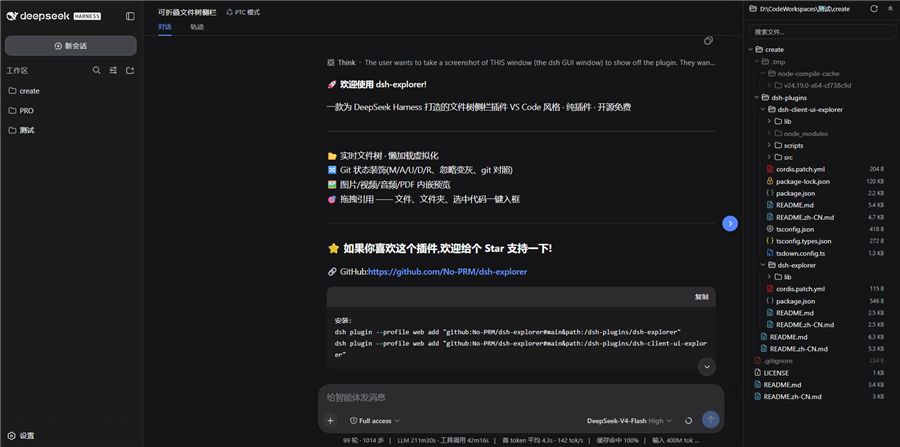
What you get
- A right-side drawer (drag the edge to resize) with a floating blue toggle; open state and width are remembered
- VS Code-style indent guides, hover highlights the active line
- Git status at a glance: M/A/U/D/R letters in a right-aligned column, tinted filenames, dirty dots on folders, struck-through rows for deleted files, gitignored entries dimmed
- Modified files get a git diff view (HEAD vs working tree, side-by-side) right in the preview
- Click a file to preview it — text opens in CodeMirror (Ctrl+F gives a VS Code-like find bar), images/video/audio/PDF play inline
- Drag any file/folder (or selected code from the preview) into the chat input — inserts an XML-tagged reference (
<reference path="…" lines="…" />) and shows a removable chip above the composer - Search (skips .git and node_modules), expand/collapse-all, auto-refresh every 1.2 s
Two packages
| package | what it does |
|---|---|
dsh-explorer |
Host side (Node). Serves the read-only /filetree/* API: directory listing, file read, search, git status, raw media streaming. No dependencies. |
dsh-client-ui-explorer |
Browser side (TS/TSX). The toggle, the drawer, and everything you see. |
Both follow the official dsh plugin contract. Wiring and deployment details live in dsh-plugins/README.md.
Install
You need both halves. Bundle install (monorepo — one command per package):
dsh plugin --profile web add "github:No-PRM/dsh-explorer#main&path:/dsh-plugins/dsh-explorer"
dsh plugin --profile web add "github:No-PRM/dsh-explorer#main&path:/dsh-plugins/dsh-client-ui-explorer"
# restart dsh
(Dev machine: keep the junction + cordis.patch.yml insert-row setup — don't run the bundle commands in the same profile.)
Manual (dev, no restart): copy the two packages into the profile's node_modules and add them to its cordis.patch.yml:
- insert:
    - id: filetree
      name: dsh-explorer-v1
    - id: ui-filetree
      name: dsh-client-ui-explorer
Restart dsh — or bump the host package name (v8, v9…) to avoid the restart. The browser bundle is self-contained; no npm install needed to run it. Full steps: dsh-plugins/README.md.
Development
cd dsh-plugins/dsh-client-ui-explorer
npm run dev        # watch + sync into the running profile
npm run bundle     # one-shot minified build
npm run types      # generate lib/types/*.d.ts
npm run typecheck
Host changes go into dsh-plugins/dsh-explorer/lib/index.js; copy it into the profile under a bumped package name to reload without restarting.
Docs
- dsh-plugins — architecture, install, deploy (中文: README.zh-CN.md)
- dsh-client-ui-explorer (中文: README.zh-CN.md)
- dsh-explorer (中文: README.zh-CN.md)
MIT
安装
装一次目录插件,之后本站所有插件都能让 DeepSeek Harness 自动找、自动装:
dsh plugin add dshbase-catalog然后对 agent 说「帮我装 dsh-explorer」,它会在目录里找到并自动安装。文档:dshbase-catalog · 已验证场景包。
该插件是 GitHub 源码(未发 npm)——直接从仓库装:
Web profile:
dsh plugin --profile web add github:No-PRM/dsh-explorerHeadless(CLI)profile:
dsh plugin --profile headless add github:No-PRM/dsh-explorer实测报告
验证通过:从 GitHub 源码完成 L1 安装 + L2 加载 + L3 运行(dsh 0.1.0-rc.6)。
使用场景
扩展 agent 的编码能力面——给它一个新工具、工作流或集成,让它接手以前做不了的开发任务。
适合谁
想让 dsh 在真实代码库上像队友一样干活的开发者——能改、能跑、能验证,而不只是回答问题。
二次开发建议
工具/命令面就是缝:暴露更多 SDK 能力、加更聪明的上下文接线,或收紧改代码与验证之间的循环。
分享徽章
把这枚徽章粘进 README——它会链回本页,实测状态变化时自动更新:

[](https://dshbase.com/zh/plugins/dsh-explorer/)<a href="https://dshbase.com/zh/plugins/dsh-explorer/"><img src="https://dshbase.com/badges/dsh-explorer.svg" alt="dshbase 实测可装"></a>