
Plugin directory / Developer / dsh-explorer
dsh-explorer
Verified · install-tested on dsh No-PRM
What it does
DSH plugin: VS Code-style file-tree explorer (git decorations, preview, diff, drag-to-reference); install via dsh plugin --profile web add.
Works — verified, early-stage project
DSH plugin: VS Code-style file-tree explorer (git decorations, preview, diff, drag-to-reference); install via dsh plugin --profile web add. It installs cleanly and boots without issues in our testing. It's early-stage but functional.
“Verified” means our automated CI actually ran dsh plugin add in a clean profile and it booted — nothing more. Feature descriptions and version compatibility are the author’s claims. This is not a security audit and not an endorsement of third-party code.
README
dsh-explorer
A file-tree sidebar for the DeepSeek Harness web UI. A blue round button on the right edge opens a drawer with the current workspace's files — lazy-loaded and virtualized, so even big directories stay responsive.
The plugins only add UI and a few read-only routes. Nothing in the shipped dsh packages is touched, so dsh updates shouldn't break anything.
Install (two commands — monorepo)
dsh plugin --profile web add "github:No-PRM/dsh-explorer#main&path:/dsh-plugins/dsh-explorer"
dsh plugin --profile web add "github:No-PRM/dsh-explorer#main&path:/dsh-plugins/dsh-client-ui-explorer"
# restart dsh
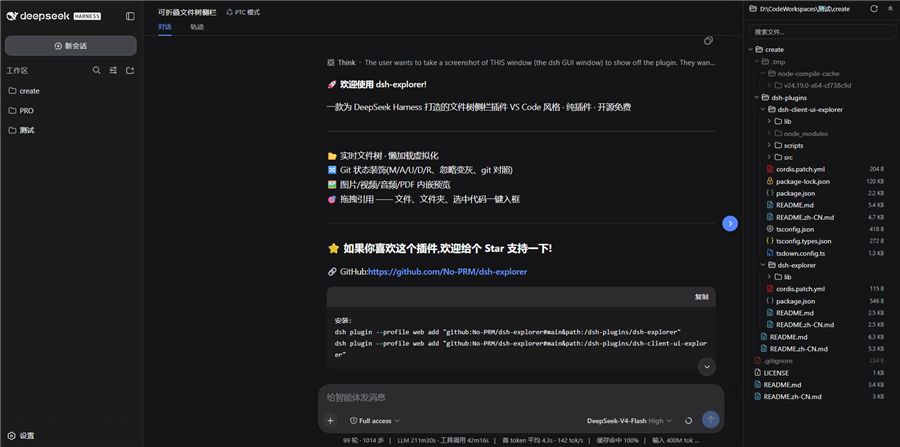
What you get
- A right-side drawer (drag the edge to resize) with a floating blue toggle; open state and width are remembered
- VS Code-style indent guides, hover highlights the active line
- Git status at a glance: M/A/U/D/R letters in a right-aligned column, tinted filenames, dirty dots on folders, struck-through rows for deleted files, gitignored entries dimmed
- Modified files get a git diff view (HEAD vs working tree, side-by-side) right in the preview
- Click a file to preview it — text opens in CodeMirror (Ctrl+F gives a VS Code-like find bar), images/video/audio/PDF play inline
- Drag any file/folder (or selected code from the preview) into the chat input — inserts an XML-tagged reference (
<reference path="…" lines="…" />) and shows a removable chip above the composer - Search (skips .git and node_modules), expand/collapse-all, auto-refresh every 1.2 s
Two packages
| package | what it does |
|---|---|
dsh-explorer |
Host side (Node). Serves the read-only /filetree/* API: directory listing, file read, search, git status, raw media streaming. No dependencies. |
dsh-client-ui-explorer |
Browser side (TS/TSX). The toggle, the drawer, and everything you see. |
Both follow the official dsh plugin contract. Wiring and deployment details live in dsh-plugins/README.md.
Install
You need both halves. Bundle install (monorepo — one command per package):
dsh plugin --profile web add "github:No-PRM/dsh-explorer#main&path:/dsh-plugins/dsh-explorer"
dsh plugin --profile web add "github:No-PRM/dsh-explorer#main&path:/dsh-plugins/dsh-client-ui-explorer"
# restart dsh
(Dev machine: keep the junction + cordis.patch.yml insert-row setup — don't run the bundle commands in the same profile.)
Manual (dev, no restart): copy the two packages into the profile's node_modules and add them to its cordis.patch.yml:
- insert:
    - id: filetree
      name: dsh-explorer-v1
    - id: ui-filetree
      name: dsh-client-ui-explorer
Restart dsh — or bump the host package name (v8, v9…) to avoid the restart. The browser bundle is self-contained; no npm install needed to run it. Full steps: dsh-plugins/README.md.
Development
cd dsh-plugins/dsh-client-ui-explorer
npm run dev        # watch + sync into the running profile
npm run bundle     # one-shot minified build
npm run types      # generate lib/types/*.d.ts
npm run typecheck
Host changes go into dsh-plugins/dsh-explorer/lib/index.js; copy it into the profile under a bumped package name to reload without restarting.
Docs
- dsh-plugins — architecture, install, deploy (中文: README.zh-CN.md)
- dsh-client-ui-explorer (中文: README.zh-CN.md)
- dsh-explorer (中文: README.zh-CN.md)
MIT
Install
Install the catalog once, then DeepSeek Harness can find and install any plugin from this site automatically:
dsh plugin add dshbase-catalogThen say "install dsh-explorer for me" — your agent finds it in the directory and installs it. Docs: dshbase-catalog · verified packs.
This plugin is GitHub source (not published to npm) — install it straight from the repo:
Web profile:
dsh plugin --profile web add github:No-PRM/dsh-explorerHeadless (CLI) profile:
dsh plugin --profile headless add github:No-PRM/dsh-explorerTest report
Verified: L1 install + L2 load + L3 runtime from GitHub source on dsh 0.1.0-rc.6.
When to use it
Extend the agent's coding surface — give it a new tool, workflow, or integration so it handles a dev task it couldn't before.
Who it's for
Developers who want dsh to behave like a teammate on real codebases — editing, running, and verifying changes rather than just answering.
For developers — extending it
The tool/command surface is the seam: expose more of the SDK, add smarter context wiring, or tighten the loop between code changes and verification.
Share this badge
Drop this badge into your README — it links back here and updates automatically when our test status changes:

[](https://dshbase.com/plugins/dsh-explorer/)<a href="https://dshbase.com/plugins/dsh-explorer/"><img src="https://dshbase.com/badges/dsh-explorer.svg" alt="dshbase install-tested"></a>