
插件目录 / UI & Skins / dsh-input-plus
dsh-input-plus
已验证 · 实测可装 WhitePlusMS
功能简介
DSH Web UI插件:工作区文件引用、提示历史、轻量编辑器增强。
可用 — 实测通过,早期项目
DSH Web UI插件:工作区文件引用、提示历史、轻量编辑器增强。 实测能干净安装、正常启动。早期项目,但功能可用。
「已验证」表示我们的自动化 CI 在干净 profile 里实际执行了 dsh plugin add 并启动成功——仅此而已。功能描述与版本兼容性均为作者声明。这不是安全审计,也不代表对第三方代码的背书。
README
dsh-input-plus

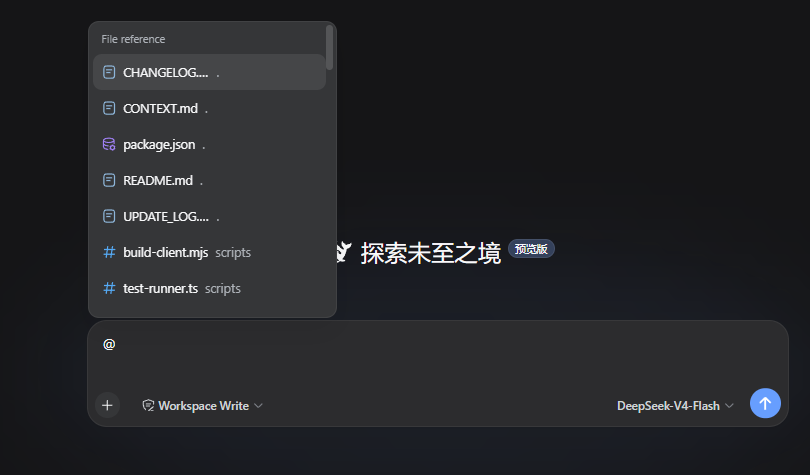
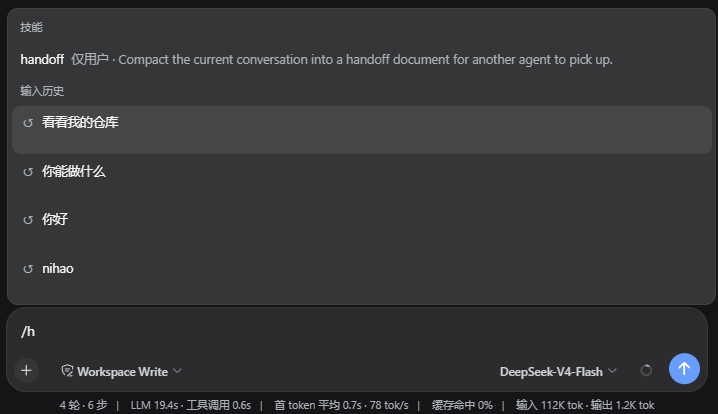
An input composer enhancement plugin for the DSH Web UI. On the Host side, it builds an index of the active workspace. In the browser, it connects to DSH's official @ input trigger so files and directories can be searched and inserted into the composer. Type /h to open a candidate menu of previous prompts from the current Session.
Features
@ file and directory path selection
Type @ in the DSH composer, then continue with a file name, directory name, or path fragment. The candidate menu lists files and directories from the current Session workspace. After selection, the draft keeps a plain-text path reference, for example:
@src/contract.ts
The reference contains only the path. Sending the message does not read the file, expand the directory, or generate a directory manifest. When the model needs the target, it can inspect the path with the native workspace tools provided by the current Session.
After selecting a directory, you can continue with an instruction:
@src Find the code responsible for candidate ranking
The official input-trigger pipeline owns the candidate menu, caret, and write-back behavior. This plugin does not replace the official textarea, send button, or candidate menu, and it does not take over native arrow-key behavior.
/h input history
Type /h in the composer to open the history candidate menu through DSH's official / input trigger. You can continue typing a keyword to filter the results, for example:
/h
The candidates contain only user prompts that were successfully submitted in the current Session, ordered from most recent to oldest.
Installation
Requires DSH 0.1.0-rc.6 or a compatible DSH Web profile. Install through the official DSH profile plugin flow:
dsh plugin --profile web add https://github.com/WhitePlusMS/dsh-input-plus/archive/refs/tags/v0.0.2.tar.gz
GitHub tag installation consumes the committed lib/ Host and Client artifacts directly.
Before creating or updating an installation tag, run pnpm run build and include the
generated lib/ directory in the commit; installing a source-only archive will fail
because the package entry points resolve to lib/index.js and lib/client.js.
Configuration
The plugin registers the input-plus settings namespace. The options used by workspace indexing and path resolution are:
| Option | Default | Range | Description |
|---|---|---|---|
maxIndexDepth |
3 |
0–10 |
Maximum workspace indexing depth |
maxIndexEntries |
200 |
1–2000 |
Maximum number of entries retained per candidate index |
referenceRoot |
'' |
Absolute path or empty | Overrides the current Session workspace; empty uses the Session workspace |
Development
Requirements: Node.js 18+ and pnpm.
pnpm install

# TypeScript type checking
pnpm run typecheck

# Run the in-process test suite
pnpm test

# Build the Host and browser bundles
pnpm run build

# Check that lib/client.js is synchronized with the source
pnpm run check:client
The build has two parts:
tsc -p tsconfig.build.jsongenerates the Host code and declaration files;scripts/build-client.mjsuses the TypeScript Compiler API to generatelib/client.jsin-process, avoiding an esbuild service subprocess in restricted environments.
Repository layout
src/
  index.ts            Host plugin entry, settings, and HTTP routes
  contract.ts         Minimal Host/Client wire contract
  host/
    files.ts          Workspace indexing, matching, and path safety
    git.ts            Git modification state
    settings.ts       Settings schema and defaults
    workspace.ts      Session workspace resolution
  client/
    index.ts          Browser plugin entry
    input-source.ts   @ candidate source and path write-back
    history-source.ts /h and /history candidate source and two-line menu styles
    history-recorder.ts Current Session prompt recording
    find.ts           Client candidate matching and ranking
    file-icons.ts     Candidate icons
    input-status.ts   Composer status dock
scripts/
  build-client.mjs    Browser bundle builder
  test-runner.ts      In-process test entry
License
MIT
安装
装一次目录插件,之后本站所有插件都能让 DeepSeek Harness 自动找、自动装:
dsh plugin add dshbase-catalog然后对 agent 说「帮我装 dsh-input-plus」,它会在目录里找到并自动安装。文档:dshbase-catalog · 已验证场景包。
该插件是 GitHub 源码(未发 npm)——直接从仓库装:
Web profile:
dsh plugin --profile web add github:WhitePlusMS/dsh-input-plusHeadless(CLI)profile:
dsh plugin --profile headless add github:WhitePlusMS/dsh-input-plus实测报告
验证通过:从 GitHub 源码完成 L1 安装 + L2 加载 + L3 运行(dsh 0.1.0-rc.6)。
使用场景
改变 dsh 的外观或交互方式——一套主题、皮肤或新面板,重塑工作区。
适合谁
在 web UI 里一待几小时、想让它按自己的习惯好看又好用的人。
二次开发建议
皮肤、面板和主题 token 是扩展点——写新皮肤、加面板,或与上游配色同步 token。
分享徽章
把这枚徽章粘进 README——它会链回本页,实测状态变化时自动更新:

[](https://dshbase.com/zh/plugins/dsh-input-plus/)<a href="https://dshbase.com/zh/plugins/dsh-input-plus/"><img src="https://dshbase.com/badges/dsh-input-plus.svg" alt="dshbase 实测可装"></a>