
Plugin directory / UI & Skins / dsh-input-plus
dsh-input-plus
Verified · install-tested on dsh WhitePlusMS
What it does
DSH Web UI plugin for workspace file references, prompt history, and lightweight composer enhancements.
Works — verified, early-stage project
DSH Web UI plugin for workspace file references, prompt history, and lightweight composer enhancements. It installs cleanly and boots without issues in our testing. It's early-stage but functional.
“Verified” means our automated CI actually ran dsh plugin add in a clean profile and it booted — nothing more. Feature descriptions and version compatibility are the author’s claims. This is not a security audit and not an endorsement of third-party code.
README
dsh-input-plus

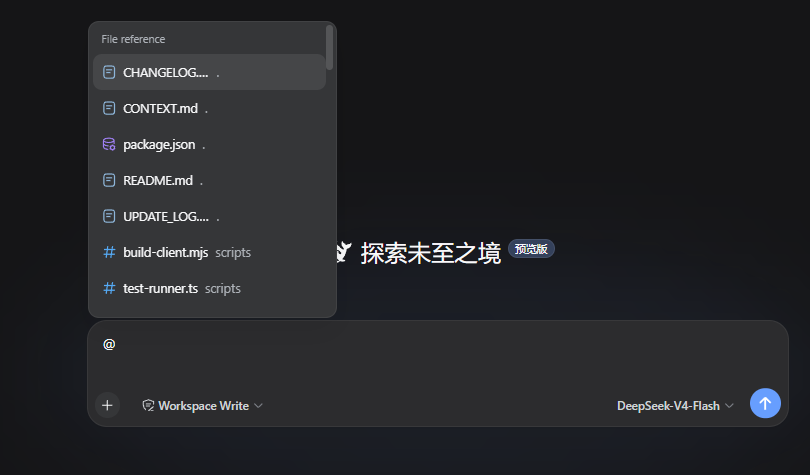
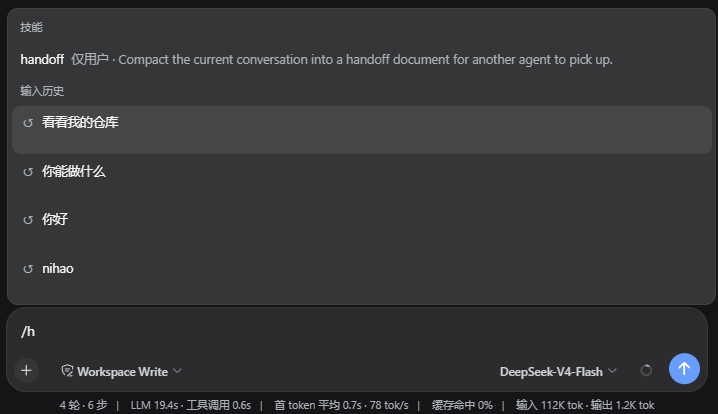
An input composer enhancement plugin for the DSH Web UI. On the Host side, it builds an index of the active workspace. In the browser, it connects to DSH's official @ input trigger so files and directories can be searched and inserted into the composer. Type /h to open a candidate menu of previous prompts from the current Session.
Features
@ file and directory path selection
Type @ in the DSH composer, then continue with a file name, directory name, or path fragment. The candidate menu lists files and directories from the current Session workspace. After selection, the draft keeps a plain-text path reference, for example:
@src/contract.ts
The reference contains only the path. Sending the message does not read the file, expand the directory, or generate a directory manifest. When the model needs the target, it can inspect the path with the native workspace tools provided by the current Session.
After selecting a directory, you can continue with an instruction:
@src Find the code responsible for candidate ranking
The official input-trigger pipeline owns the candidate menu, caret, and write-back behavior. This plugin does not replace the official textarea, send button, or candidate menu, and it does not take over native arrow-key behavior.
/h input history
Type /h in the composer to open the history candidate menu through DSH's official / input trigger. You can continue typing a keyword to filter the results, for example:
/h
The candidates contain only user prompts that were successfully submitted in the current Session, ordered from most recent to oldest.
Installation
Requires DSH 0.1.0-rc.6 or a compatible DSH Web profile. Install through the official DSH profile plugin flow:
dsh plugin --profile web add https://github.com/WhitePlusMS/dsh-input-plus/archive/refs/tags/v0.0.2.tar.gz
GitHub tag installation consumes the committed lib/ Host and Client artifacts directly.
Before creating or updating an installation tag, run pnpm run build and include the
generated lib/ directory in the commit; installing a source-only archive will fail
because the package entry points resolve to lib/index.js and lib/client.js.
Configuration
The plugin registers the input-plus settings namespace. The options used by workspace indexing and path resolution are:
| Option | Default | Range | Description |
|---|---|---|---|
maxIndexDepth |
3 |
0–10 |
Maximum workspace indexing depth |
maxIndexEntries |
200 |
1–2000 |
Maximum number of entries retained per candidate index |
referenceRoot |
'' |
Absolute path or empty | Overrides the current Session workspace; empty uses the Session workspace |
Development
Requirements: Node.js 18+ and pnpm.
pnpm install

# TypeScript type checking
pnpm run typecheck

# Run the in-process test suite
pnpm test

# Build the Host and browser bundles
pnpm run build

# Check that lib/client.js is synchronized with the source
pnpm run check:client
The build has two parts:
tsc -p tsconfig.build.jsongenerates the Host code and declaration files;scripts/build-client.mjsuses the TypeScript Compiler API to generatelib/client.jsin-process, avoiding an esbuild service subprocess in restricted environments.
Repository layout
src/
  index.ts            Host plugin entry, settings, and HTTP routes
  contract.ts         Minimal Host/Client wire contract
  host/
    files.ts          Workspace indexing, matching, and path safety
    git.ts            Git modification state
    settings.ts       Settings schema and defaults
    workspace.ts      Session workspace resolution
  client/
    index.ts          Browser plugin entry
    input-source.ts   @ candidate source and path write-back
    history-source.ts /h and /history candidate source and two-line menu styles
    history-recorder.ts Current Session prompt recording
    find.ts           Client candidate matching and ranking
    file-icons.ts     Candidate icons
    input-status.ts   Composer status dock
scripts/
  build-client.mjs    Browser bundle builder
  test-runner.ts      In-process test entry
License
MIT
Install
Install the catalog once, then DeepSeek Harness can find and install any plugin from this site automatically:
dsh plugin add dshbase-catalogThen say "install dsh-input-plus for me" — your agent finds it in the directory and installs it. Docs: dshbase-catalog · verified packs.
This plugin is GitHub source (not published to npm) — install it straight from the repo:
Web profile:
dsh plugin --profile web add github:WhitePlusMS/dsh-input-plusHeadless (CLI) profile:
dsh plugin --profile headless add github:WhitePlusMS/dsh-input-plusTest report
Verified: L1 install + L2 load + L3 runtime from GitHub source on dsh 0.1.0-rc.6.
When to use it
Change how dsh looks or how you interact with it — a theme, a skin, or a new panel that reshapes the workspace.
Who it's for
Users who spend hours in the web UI and want it to look and feel the way they work.
For developers — extending it
Skins, panels, and theme tokens are the extension points — author a new skin, add a panel, or sync tokens with an upstream palette.
Share this badge
Drop this badge into your README — it links back here and updates automatically when our test status changes:

[](https://dshbase.com/plugins/dsh-input-plus/)<a href="https://dshbase.com/plugins/dsh-input-plus/"><img src="https://dshbase.com/badges/dsh-input-plus.svg" alt="dshbase install-tested"></a>