
插件目录 / Developer / dsh-mcp-admin
dsh-mcp-admin
已验证 · 实测可装 kairoz9
功能简介
查看MCP服务器状态并管理配置文件
可用 — 实测通过,早期项目
查看MCP服务器状态并管理配置文件 实测能干净安装、正常启动。早期项目,但功能可用。
「已验证」表示我们的自动化 CI 在干净 profile 里实际执行了 dsh plugin add 并启动成功——仅此而已。功能描述与版本兼容性均为作者声明。这不是安全审计,也不代表对第三方代码的背书。
README
dsh-mcp-admin
English | 简体中文
A dsh (DeepSeek Harness) plugin: Inspect MCP status (/mcp command) + Manage MCP servers in Settings (add / edit / delete / enable / disable, written back to cordis.patch.yml). MIT licensed.
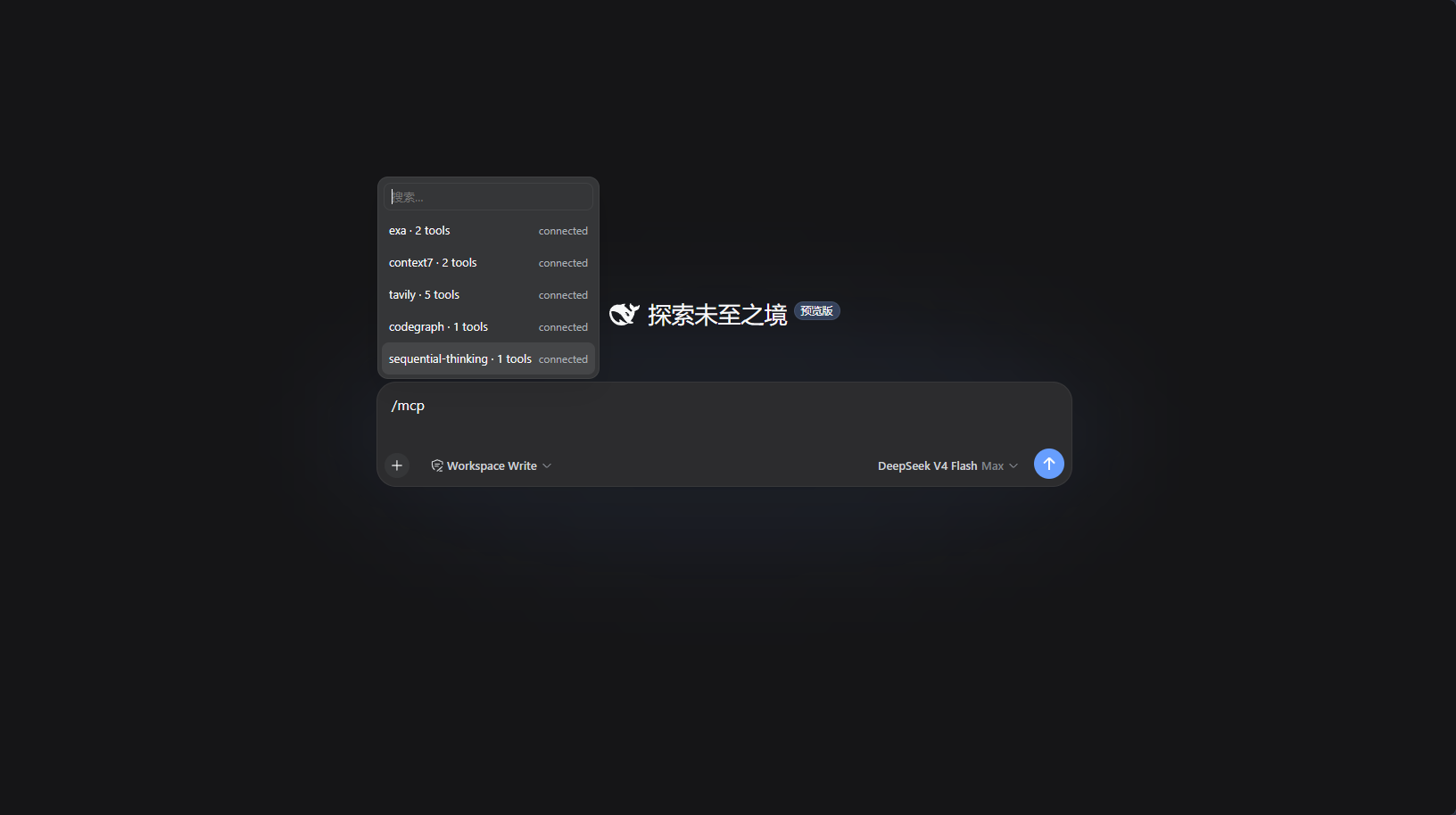
/mcp command output:
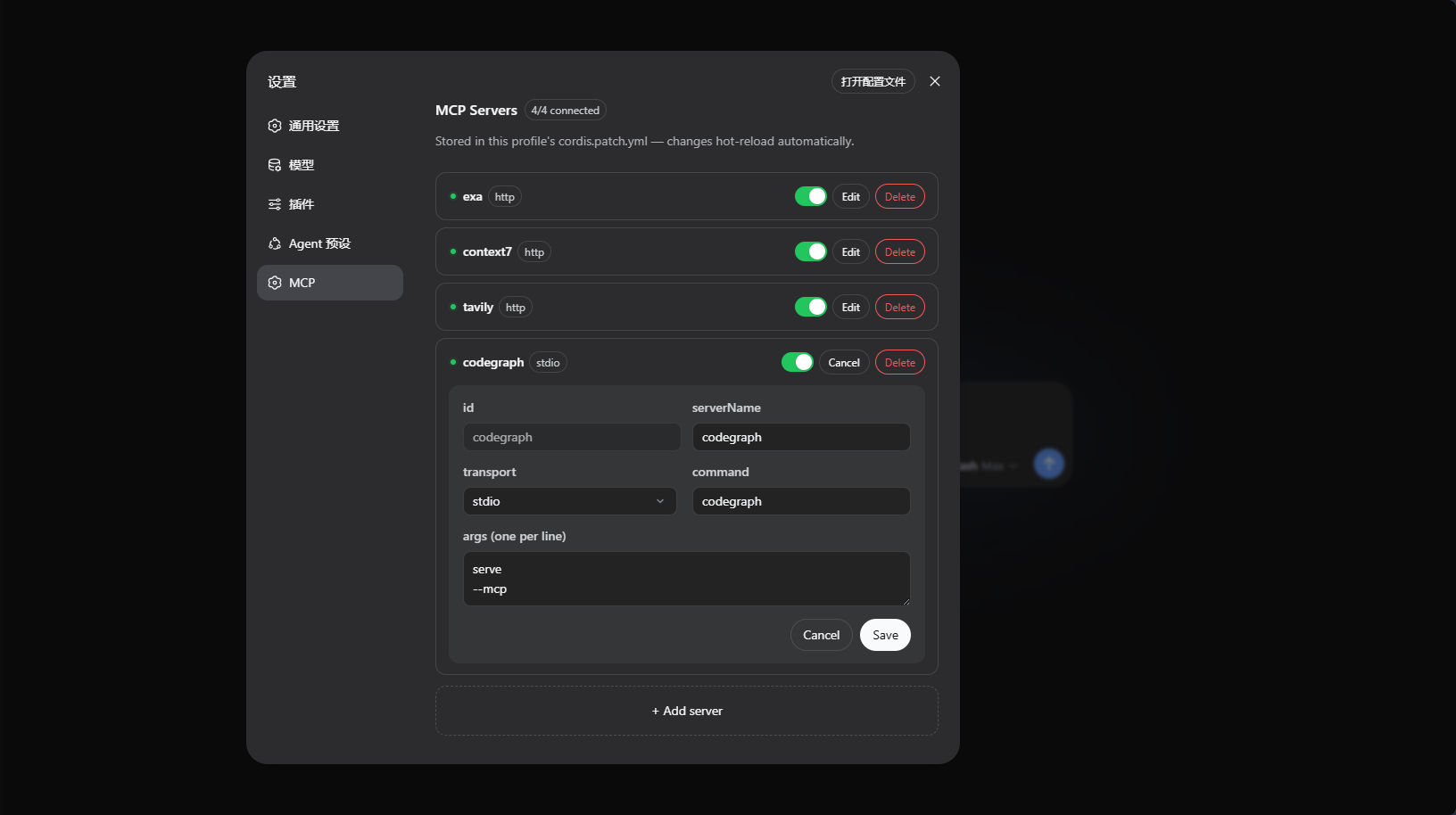
Settings page "MCP" panel:
Installation
Release tarball (Recommended, no build required): Download dsh-mcp-admin-<version>.tgz from Releases, then run:
dsh plugin --profile web add ./dsh-mcp-admin-0.2.0.tgz
Build tarball locally (if building yourself):
pnpm run build        # Builds to lib/
pnpm pack             # Packages into tarball
dsh plugin --profile web add ./dsh-mcp-admin-0.2.0.tgz
Git repository (installs from source via prepare build):
dsh plugin --profile web add github:kairoz9/dsh-mcp-admin
pnpm ≥10 refuses to run the
preparescript of git dependencies by default, which causes the initial Git installation to fail. dsh will print the fix in the error message: add the package key to that profile'spnpm-workspace.yamland re-runadd:allowBuilds: dsh-mcp-admin: trueIt is recommended to pin a commit or tag:
github:kairoz9/dsh-mcp-admin#v0.2.0.
Usage
/mcp— Lists MCP servers across all profiles + live tool count (including never-connected servers, read from full config inventory).- Settings page "MCP" panel — Manage MCP servers per profile: add / edit / disable / enable / delete, with status dots auto-refreshing every second. Saving writes back to that profile's
cordis.patch.yml, and dsh automatically hot-reloads (HMR).
How It Works
Host-side McpAdminRemote (TypertRemoteService, @Remote methods) is auto-discovered by the host gateway. The browser client self-mounts this namespace via ctx.remote.$mount, and both the panel and /mcp popup read the same structured data:
list()— Reads the full server inventory from the profile'scordis.patch.yml, then filtersmcp__prefix withctx.tools.schemas()to annotate real-time tool counts; enumerates activemcp-clientinstances from Cordis registry to distinguish "connected / instance present with 0 tools (connection failed) / not loaded".set()— Reconciles and writes back tocordis.patch.yml(single atomic write, comments preserved), and dsh'swatchUserPatchesHMR automatically reloadsmcp-client./mcpcommand reads all profiles and outputs the tool list for each server.
安装
装一次目录插件,之后本站所有插件都能让 DeepSeek Harness 自动找、自动装:
dsh plugin add dshbase-catalog然后对 agent 说「帮我装 dsh-mcp-admin」,它会在目录里找到并自动安装。文档:dshbase-catalog · 已验证场景包。
该插件是 GitHub 源码(未发 npm)——直接从仓库装:
Web profile:
dsh plugin --profile web add github:kairoz9/dsh-mcp-adminHeadless(CLI)profile:
dsh plugin --profile headless add github:kairoz9/dsh-mcp-admin实测报告
验证通过:从 GitHub 源码完成 L1 安装 + L2 加载 + L3 运行(dsh 0.1.0-rc.6)。
使用场景
扩展 agent 的编码能力面——给它一个新工具、工作流或集成,让它接手以前做不了的开发任务。
适合谁
想让 dsh 在真实代码库上像队友一样干活的开发者——能改、能跑、能验证,而不只是回答问题。
二次开发建议
工具/命令面就是缝:暴露更多 SDK 能力、加更聪明的上下文接线,或收紧改代码与验证之间的循环。
分享徽章
把这枚徽章粘进 README——它会链回本页,实测状态变化时自动更新:

[](https://dshbase.com/zh/plugins/dsh-mcp-admin/)<a href="https://dshbase.com/zh/plugins/dsh-mcp-admin/"><img src="https://dshbase.com/badges/dsh-mcp-admin.svg" alt="dshbase 实测可装"></a>