
插件目录 / Developer / dsh-open-terminal
dsh-open-terminal
已验证 · 实测可装 d3cker
功能简介
OpenTerminal support for DeepSeek Harness
可用 — 实测通过,早期项目
OpenTerminal support for DeepSeek Harness 实测能干净安装、正常启动。早期项目,但功能可用。
「已验证」表示我们的自动化 CI 在干净 profile 里实际执行了 dsh plugin add 并启动成功——仅此而已。功能描述与版本兼容性均为作者声明。这不是安全审计,也不代表对第三方代码的背书。
README
OpenTerminal for DeepSeek Harness
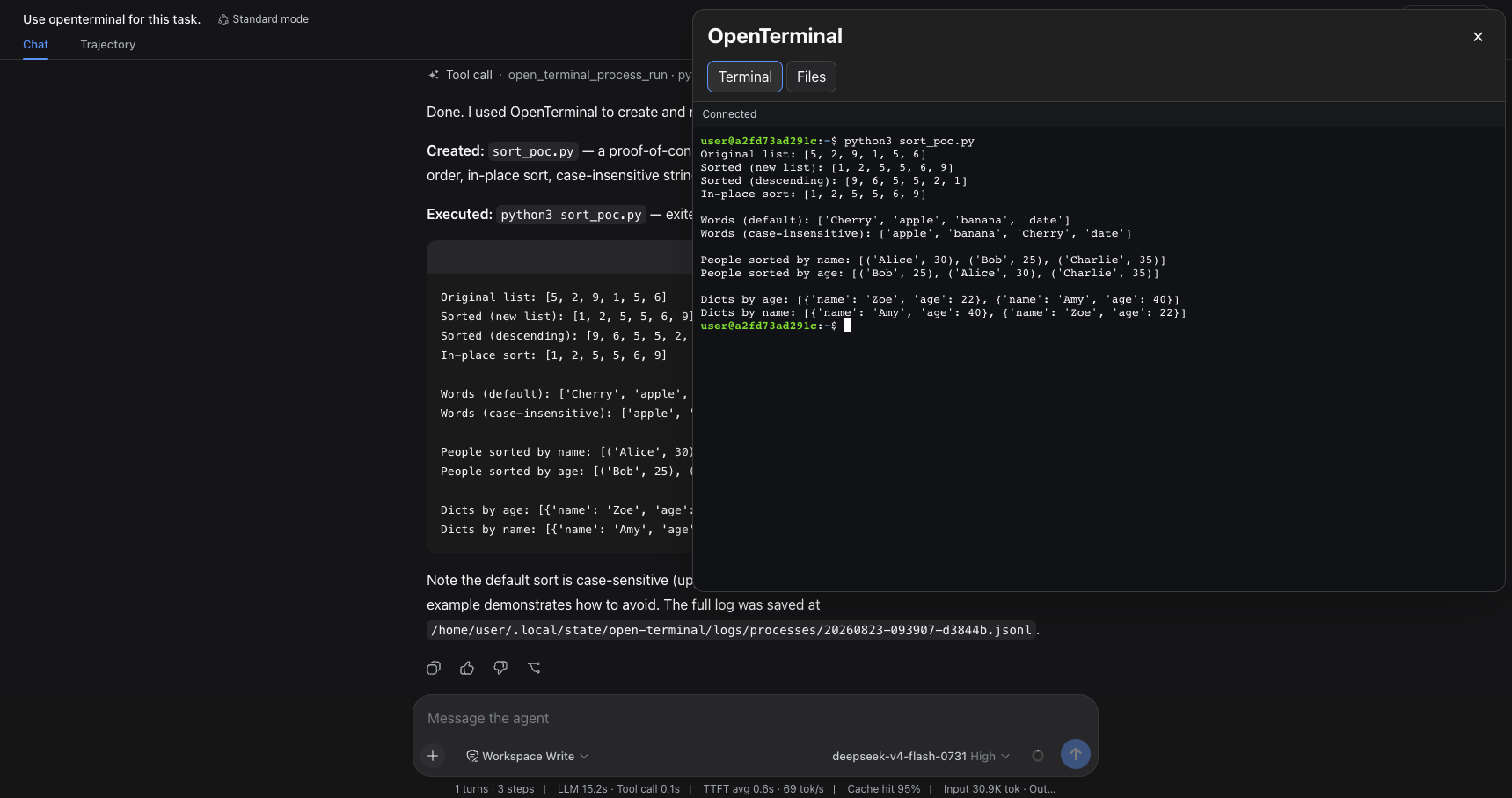
OpenTerminal for DeepSeek Harness adds an interactive terminal, a file manager,
and OpenTerminal tools to every workspace in a DSH Web profile. It connects to
an existing Open Terminal server
without requiring MCP configuration.
Features
- Interactive terminal — a WebSocket-backed xterm.js terminal with scrollback.
- Floating window — the terminal opens above the chat, keeps the chat
interactive, and closes only with the × button. - Responsive layout — the window adapts to the browser viewport and uses the
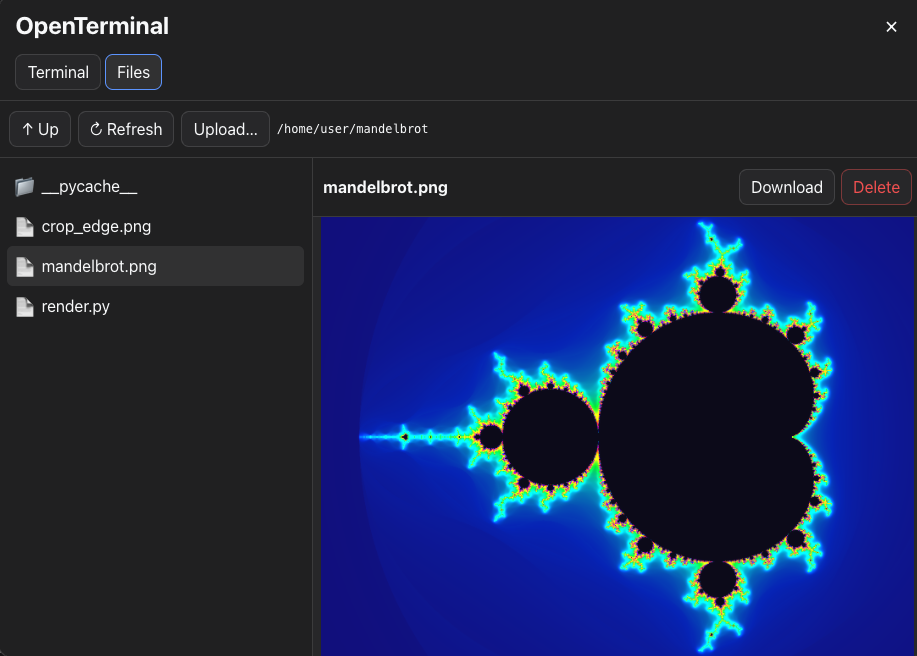
available screen area on narrow displays. - File manager — browse directories, upload multiple files, download and
delete files, edit text files, and preview images or PDFs. - Agent tools — DSH agents can manage processes and work with files through
theopen_terminal_*tools. - Profile-wide access — the sidebar button and tools are available in every
workspace using the installed DSH profile. - Protected credentials — the Open Terminal API key is stored in DSH
Credentials and is not exposed to the browser.
Requirements
- DeepSeek Harness
0.1.1-rc.2, or a compatible version; - Node.js
^22.19.0or>=24; pnpmwhen building the package from source;- a running Open Terminal server and its API key;
- a DSH Web profile, named
webby default.
Build the installation package
From the plugin directory, install dependencies, validate the package, and
create the tarball:
pnpm install
pnpm run check
pnpm pack
pnpm pack creates a file named from the package name and the version field
in package.json:
dsh-open-terminal-<version>.tgz
To inspect the package contents without extracting it:
tar -tzf dsh-open-terminal-<version>.tgz
Install
Install the prebuilt package attached to the current GitHub release:
dsh plugin --profile web add "https://github.com/d3cker/dsh-open-terminal/releases/download/v0.1.4/dsh-open-terminal-0.1.4.tgz"
or with pnpm version:
pnpm dsh plugin --profile web add "https://github.com/d3cker/dsh-open-terminal/releases/download/v0.1.4/dsh-open-terminal-0.1.4.tgz"
Use the release asset named dsh-open-terminal-<version>.tgz. The repository
URL and GitHub's automatically generated Source code archives contain source
files and require permission to run build scripts during installation.
Restart the DSH Web profile, then refresh the browser. The plugin applies to all
sessions and workspaces that use that profile. Install it separately for every
additional DSH profile where it should be available.
To verify that the plugin is part of the profile configuration:
dsh --profile web --dump-config
The output should include:
- id: open-terminal
  name: dsh-open-terminal
Configure
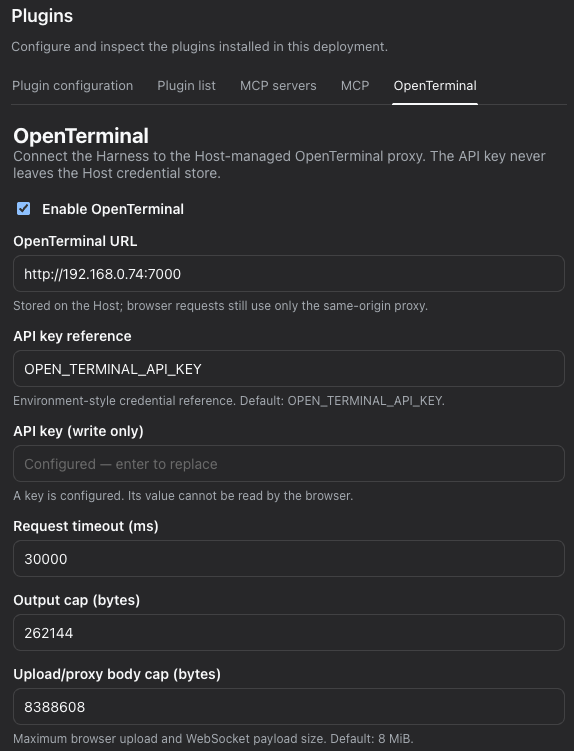
- Open Settings → Plugins → OpenTerminal in DSH Web.
- Set the OpenTerminal URL. The packaged default is
http://192.168.0.74:7000; replace it with the address of your server when
necessary. - Leave the credential reference as
OPEN_TERMINAL_API_KEY, or enter another
DSH credential reference. - Enter the API key in the write-only API key field.
- Optionally adjust the request timeout, tool-output limit, and upload/proxy
body-size limit. The default upload limit is 8 MiB and the maximum is 64 MiB. - Click Save settings, followed by Test connection.
Open the settings page through a loopback DSH address such ashttp://127.0.0.1:3080. DSH does not allow a remote page to modify global
settings or credentials.
Use the terminal
Click OpenTerminal in the left sidebar. The terminal opens in a floating
window on the right side of the chat.
- Scroll the terminal with the mouse wheel or trackpad.
- Continue using the chat while the terminal is open.
- Switch between Terminal and Files without closing the window.
- Close the window with the × button in its top-right corner.
The window scales with the viewport. On narrow screens it uses the available
screen area so the terminal and its controls remain accessible.
Use the file manager
Open the Files tab in the OpenTerminal window.
- Use Up to move to the parent directory.
- Use Refresh to reload the current directory.
- Use Upload… to select and upload one or more files.
- Select a file and click Download to save it locally.
- Select a text file to edit it, then click Save.
- Select an image or PDF to preview it.
- Click Delete and confirm the prompt to remove a file.
File operations are performed on the machine or container running Open
Terminal, not on the machine running the browser.
Agent tools
DSH agents receive the open_terminal_* tools automatically. They can:
- list, start, inspect, interact with, and stop processes;
- list, read, write, replace, search, and inspect files.
No MCP server selection or separate MCP configuration is required.
Update
Run the installation command from the current README, then restart the DSH Web
profile. The command points to the package attached to the corresponding GitHub
release.
Uninstall
dsh plugin --profile web remove dsh-open-terminal
Restart the DSH Web profile after removing the plugin.
Security note
The Open Terminal API key allows command execution and file access on the Open
Terminal server. Use a trusted, isolated server, keep DSH Web restricted to
trusted users, and use TLS or a VPN when the connection crosses an untrusted
network.
License
MIT
安装
装一次目录插件,之后本站所有插件都能让 DeepSeek Harness 自动找、自动装:
dsh plugin add dshbase-catalog然后对 agent 说「帮我装 dsh-open-terminal」,它会在目录里找到并自动安装。文档:dshbase-catalog · 已验证场景包。
该插件是 GitHub 源码(未发 npm)——直接从仓库装:
Web profile:
dsh plugin --profile web add github:d3cker/dsh-open-terminalHeadless(CLI)profile:
dsh plugin --profile headless add github:d3cker/dsh-open-terminal实测报告
验证通过:从 GitHub 源码完成 L1 安装 + L2 加载 + L3 运行(dsh 0.1.0-rc.6)。
分享徽章
把这枚徽章粘进 README——它会链回本页,实测状态变化时自动更新:

[](https://dshbase.com/zh/plugins/dsh-open-terminal/)<a href="https://dshbase.com/zh/plugins/dsh-open-terminal/"><img src="https://dshbase.com/badges/dsh-open-terminal.svg" alt="dshbase 实测可装"></a>