
Plugin directory / Developer / dsh-open-terminal
dsh-open-terminal
Verified · install-tested on dsh d3cker
What it does
OpenTerminal support for DeepSeek Harness
Works — verified, early-stage project
OpenTerminal support for DeepSeek Harness It installs cleanly and boots without issues in our testing. It's early-stage but functional.
“Verified” means our automated CI actually ran dsh plugin add in a clean profile and it booted — nothing more. Feature descriptions and version compatibility are the author’s claims. This is not a security audit and not an endorsement of third-party code.
README
OpenTerminal for DeepSeek Harness
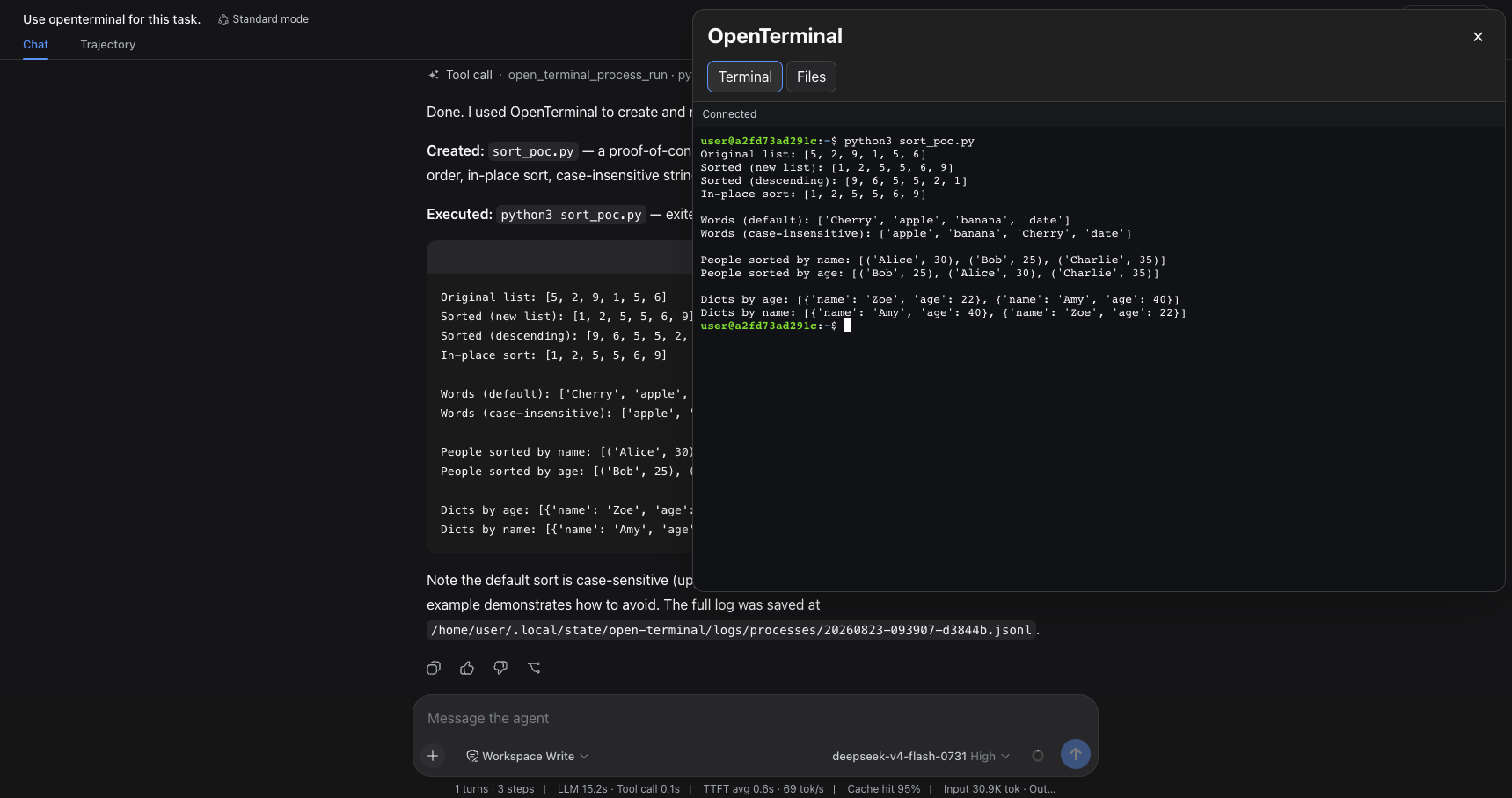
OpenTerminal for DeepSeek Harness adds an interactive terminal, a file manager,
and OpenTerminal tools to every workspace in a DSH Web profile. It connects to
an existing Open Terminal server
without requiring MCP configuration.
Features
- Interactive terminal — a WebSocket-backed xterm.js terminal with scrollback.
- Floating window — the terminal opens above the chat, keeps the chat
interactive, and closes only with the × button. - Responsive layout — the window adapts to the browser viewport and uses the
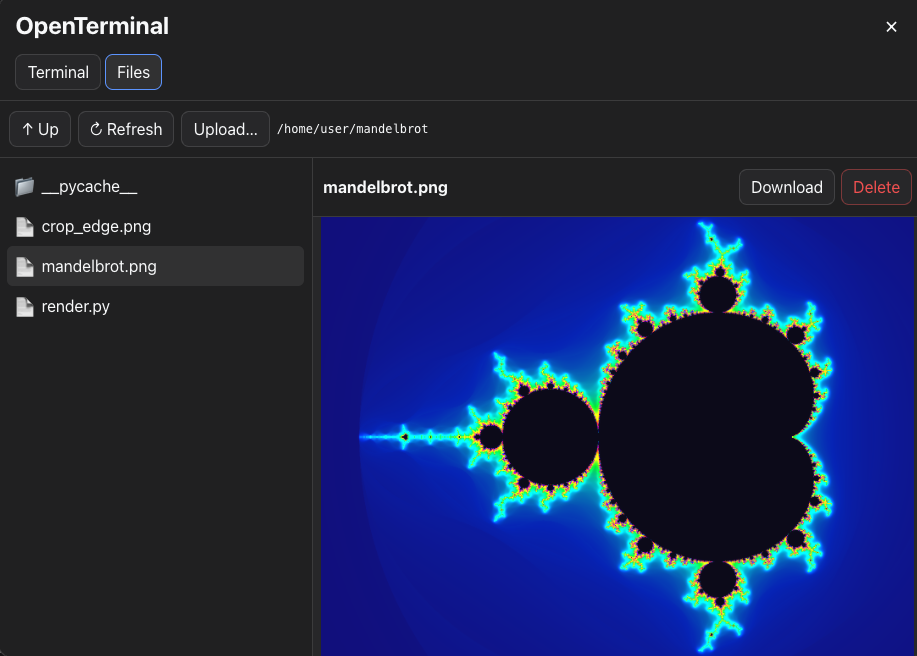
available screen area on narrow displays. - File manager — browse directories, upload multiple files, download and
delete files, edit text files, and preview images or PDFs. - Agent tools — DSH agents can manage processes and work with files through
theopen_terminal_*tools. - Profile-wide access — the sidebar button and tools are available in every
workspace using the installed DSH profile. - Protected credentials — the Open Terminal API key is stored in DSH
Credentials and is not exposed to the browser.
Requirements
- DeepSeek Harness
0.1.1-rc.2, or a compatible version; - Node.js
^22.19.0or>=24; pnpmwhen building the package from source;- a running Open Terminal server and its API key;
- a DSH Web profile, named
webby default.
Build the installation package
From the plugin directory, install dependencies, validate the package, and
create the tarball:
pnpm install
pnpm run check
pnpm pack
pnpm pack creates a file named from the package name and the version field
in package.json:
dsh-open-terminal-<version>.tgz
To inspect the package contents without extracting it:
tar -tzf dsh-open-terminal-<version>.tgz
Install
Install the prebuilt package attached to the current GitHub release:
dsh plugin --profile web add "https://github.com/d3cker/dsh-open-terminal/releases/download/v0.1.4/dsh-open-terminal-0.1.4.tgz"
or with pnpm version:
pnpm dsh plugin --profile web add "https://github.com/d3cker/dsh-open-terminal/releases/download/v0.1.4/dsh-open-terminal-0.1.4.tgz"
Use the release asset named dsh-open-terminal-<version>.tgz. The repository
URL and GitHub's automatically generated Source code archives contain source
files and require permission to run build scripts during installation.
Restart the DSH Web profile, then refresh the browser. The plugin applies to all
sessions and workspaces that use that profile. Install it separately for every
additional DSH profile where it should be available.
To verify that the plugin is part of the profile configuration:
dsh --profile web --dump-config
The output should include:
- id: open-terminal
  name: dsh-open-terminal
Configure
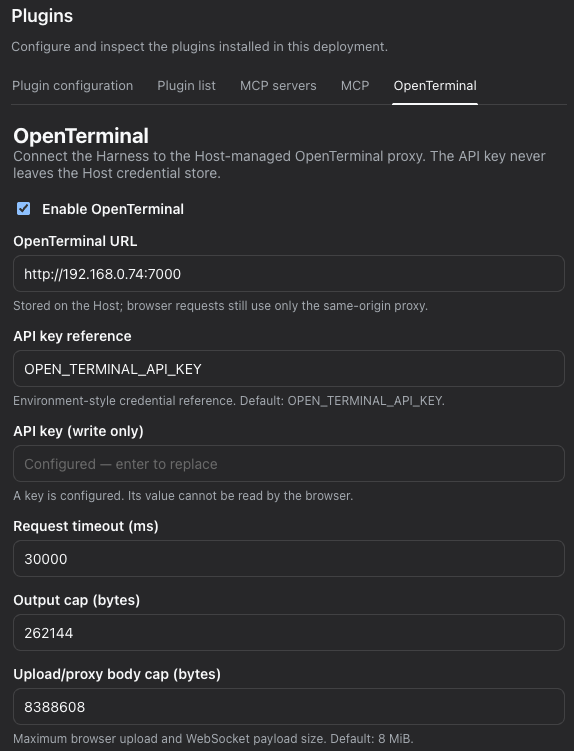
- Open Settings → Plugins → OpenTerminal in DSH Web.
- Set the OpenTerminal URL. The packaged default is
http://192.168.0.74:7000; replace it with the address of your server when
necessary. - Leave the credential reference as
OPEN_TERMINAL_API_KEY, or enter another
DSH credential reference. - Enter the API key in the write-only API key field.
- Optionally adjust the request timeout, tool-output limit, and upload/proxy
body-size limit. The default upload limit is 8 MiB and the maximum is 64 MiB. - Click Save settings, followed by Test connection.
Open the settings page through a loopback DSH address such ashttp://127.0.0.1:3080. DSH does not allow a remote page to modify global
settings or credentials.
Use the terminal
Click OpenTerminal in the left sidebar. The terminal opens in a floating
window on the right side of the chat.
- Scroll the terminal with the mouse wheel or trackpad.
- Continue using the chat while the terminal is open.
- Switch between Terminal and Files without closing the window.
- Close the window with the × button in its top-right corner.
The window scales with the viewport. On narrow screens it uses the available
screen area so the terminal and its controls remain accessible.
Use the file manager
Open the Files tab in the OpenTerminal window.
- Use Up to move to the parent directory.
- Use Refresh to reload the current directory.
- Use Upload… to select and upload one or more files.
- Select a file and click Download to save it locally.
- Select a text file to edit it, then click Save.
- Select an image or PDF to preview it.
- Click Delete and confirm the prompt to remove a file.
File operations are performed on the machine or container running Open
Terminal, not on the machine running the browser.
Agent tools
DSH agents receive the open_terminal_* tools automatically. They can:
- list, start, inspect, interact with, and stop processes;
- list, read, write, replace, search, and inspect files.
No MCP server selection or separate MCP configuration is required.
Update
Run the installation command from the current README, then restart the DSH Web
profile. The command points to the package attached to the corresponding GitHub
release.
Uninstall
dsh plugin --profile web remove dsh-open-terminal
Restart the DSH Web profile after removing the plugin.
Security note
The Open Terminal API key allows command execution and file access on the Open
Terminal server. Use a trusted, isolated server, keep DSH Web restricted to
trusted users, and use TLS or a VPN when the connection crosses an untrusted
network.
License
MIT
Install
Install the catalog once, then DeepSeek Harness can find and install any plugin from this site automatically:
dsh plugin add dshbase-catalogThen say "install dsh-open-terminal for me" — your agent finds it in the directory and installs it. Docs: dshbase-catalog · verified packs.
This plugin is GitHub source (not published to npm) — install it straight from the repo:
Web profile:
dsh plugin --profile web add github:d3cker/dsh-open-terminalHeadless (CLI) profile:
dsh plugin --profile headless add github:d3cker/dsh-open-terminalTest report
Verified: L1 install + L2 load + L3 runtime from GitHub source on dsh 0.1.0-rc.6.
Share this badge
Drop this badge into your README — it links back here and updates automatically when our test status changes:

[](https://dshbase.com/plugins/dsh-open-terminal/)<a href="https://dshbase.com/plugins/dsh-open-terminal/"><img src="https://dshbase.com/badges/dsh-open-terminal.svg" alt="dshbase install-tested"></a>