
插件目录 / Knowledge / dsh-plugin-window-stats
dsh-plugin-window-stats
已验证 · 实测可装 wellorbetter
功能简介
DSH网页插件:跨会话仪表板,显示对话进度和token用量
可用 — 实测通过,早期项目
DSH网页插件:跨会话仪表板,显示对话进度和token用量 实测能干净安装、正常启动。早期项目,但功能可用。
「已验证」表示我们的自动化 CI 在干净 profile 里实际执行了 dsh plugin add 并启动成功——仅此而已。功能描述与版本兼容性均为作者声明。这不是安全审计,也不代表对第三方代码的背书。
README
Window Stats



A DeepSeek Harness web plugin that shows every session's conversation progress and token usage at a glance.
All-windows overview · session analysis · cost estimation · token heatmap.
100% read-only and local — no outbound requests, no session writes.
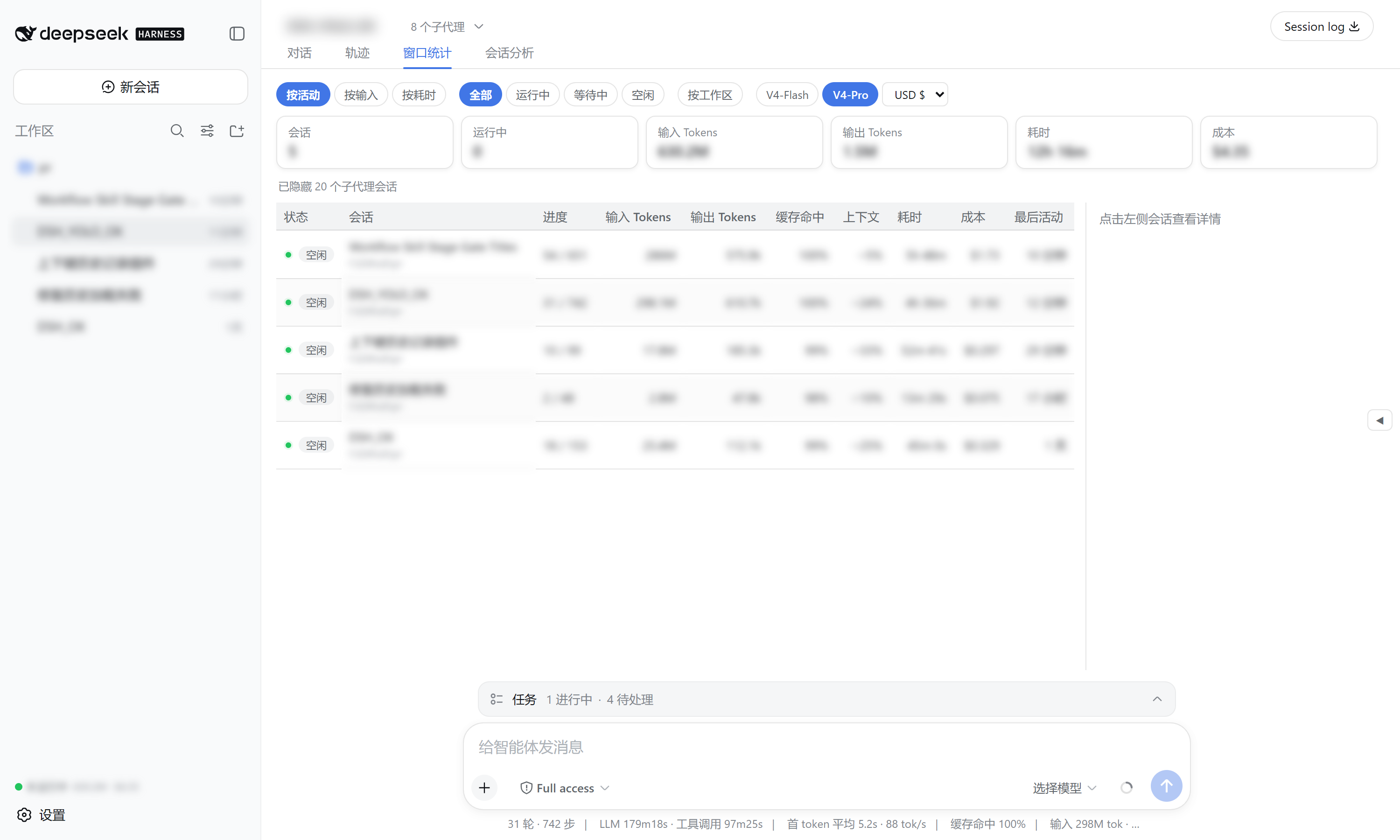
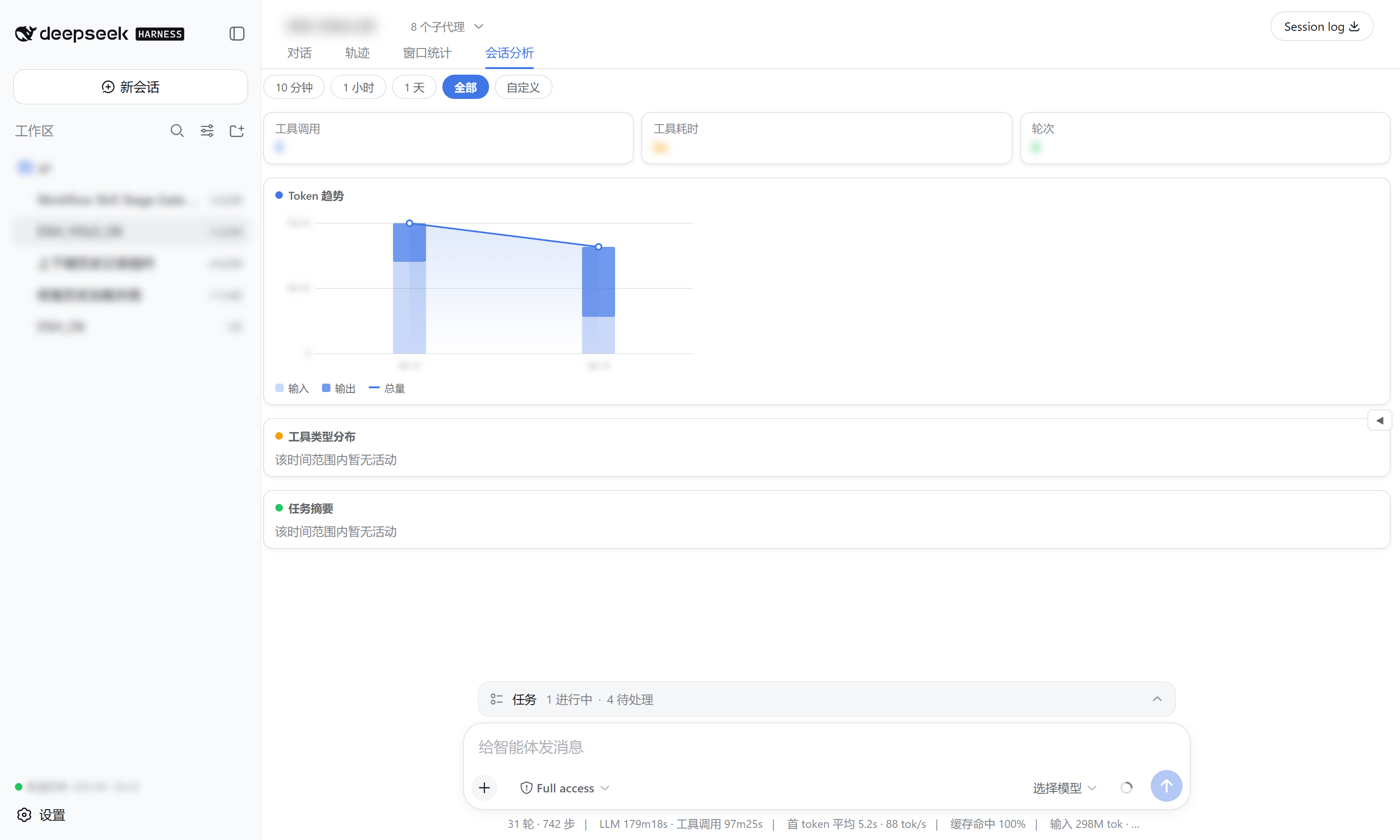
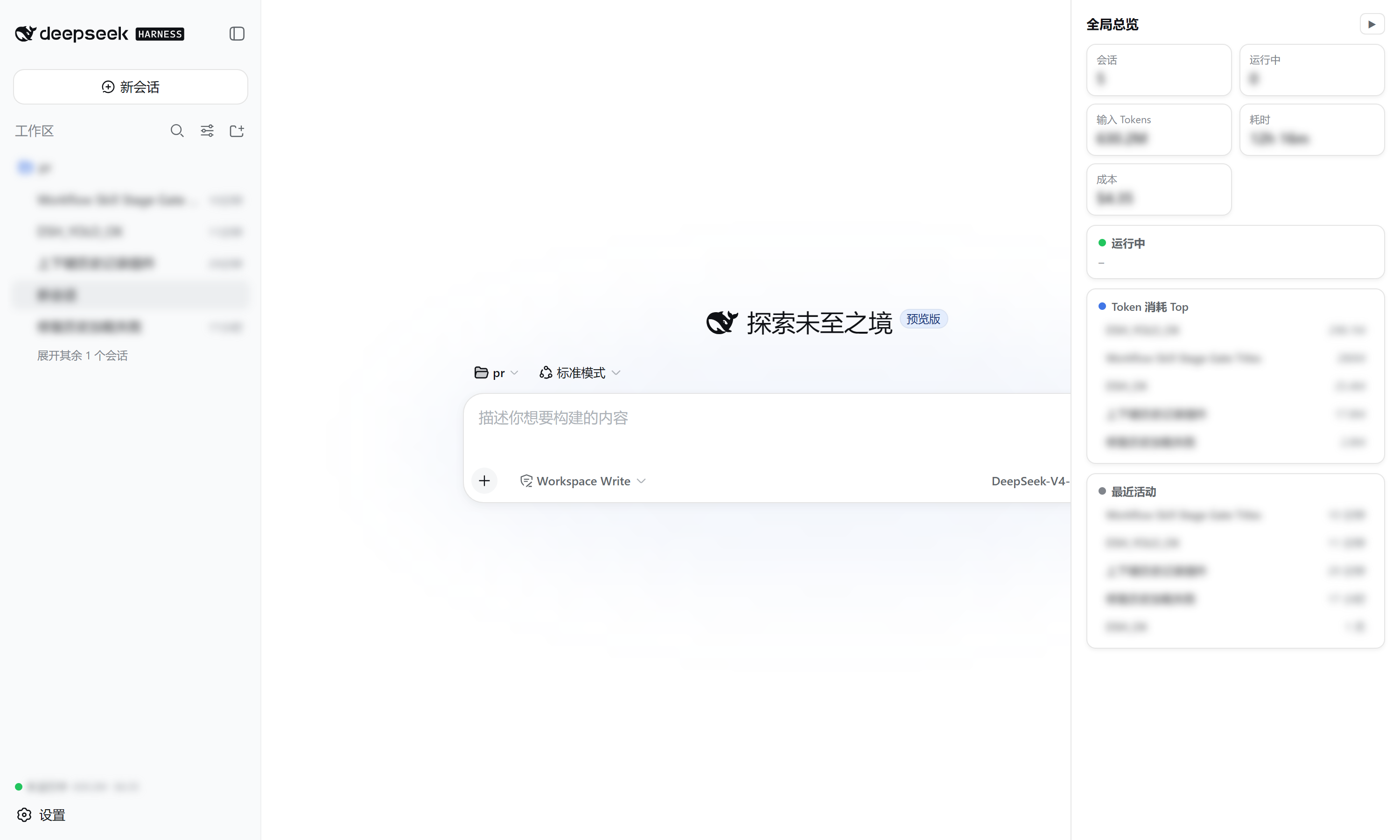
What this plugin provides
Installing this bundle adds a cross-session observability surface to every session of the target dsh profile. It reads the official tokenUsage / sessionStats / contextPressure / contextBreakdown projections (plus a tokenHistory projection it registers itself), so no host service or new RPC is required beyond that one projection unit.
| Surface | What it shows |
|---|---|
窗口统计 view tab |
One row per session: status, turns/steps, input/output tokens, cache-hit ratio, context occupancy, duration, cost, last activity — with sort / filter / group-by-workspace / model & currency selectors, and a right detail panel (token buckets, context composition, timing, heatmap). |
会话分析 view tab |
Time-range analysis (presets + custom) of the current session: token trend chart, tool-type duration distribution (donut + bars), and per-turn task summaries. |
| Sidebar footer summary | Always-visible running count, total tokens, and cost. |
| Right overview drawer | Collapsed by default; expands to a running-sessions + top-token-consumers + recent-activity panel with click-to-open. |
Data source
| Displayed | Source |
|---|---|
| turns / steps / wall times | sessionStats projection |
| input / output / cache tokens | tokenUsage projection |
| context occupancy / composition | contextPressure + contextBreakdown projections |
| per-day token history (heatmap) | tokenHistory projection (registered by this plugin) |
| status | SessionSummary.running / pendingInteraction / completed |
Cost is estimated from DeepSeek's official pricing (V4-Flash / V4-Pro, cache-hit / cache-miss / output priced separately) with USD / CNY / EUR / GBP / JPY switching.
Install
Requires the dsh CLI (install DeepSeek Harness).
# from GitHub (recommended)
dsh plugin --profile web add github:wellorbetter/dsh-plugin-window-stats

# or from a local checkout
dsh plugin --profile web add ./dsh-plugin-window-stats
Restart the profile (dsh web) after installing. The plugin is a bundle: it declares dsh.bundle.patch, so dsh plugin reconciles it into the profile's dsh.profile.bundles automatically. It ships pre-built JavaScript (lib/), so a GitHub install needs no build step or allowBuilds permission.
Use
After restarting dsh web:
- Sidebar — the footer shows running count + total tokens + cost at all times.
- 窗口统计 tab — open any session and click the tab to see every session's progress, tokens, and cost; click a row for a rich breakdown; use the toolbar to sort / filter / group / switch model & currency.
- 会话分析 tab — analyze the current session over a time range, by tool type, with a token trend chart and task summaries.
- Right drawer — click the edge handle to expand the running / top-tokens / recent overview, click any row to open it.
Development
pnpm install
pnpm verify   # typecheck + build + test
License
MIT
安装
装一次目录插件,之后本站所有插件都能让 DeepSeek Harness 自动找、自动装:
dsh plugin add dshbase-catalog然后对 agent 说「帮我装 dsh-plugin-window-stats」,它会在目录里找到并自动安装。文档:dshbase-catalog · 已验证场景包。
该插件是 GitHub 源码(未发 npm)——直接从仓库装:
Web profile:
dsh plugin --profile web add github:wellorbetter/dsh-plugin-window-statsHeadless(CLI)profile:
dsh plugin --profile headless add github:wellorbetter/dsh-plugin-window-stats实测报告
验证通过:从 GitHub 源码完成 L1 安装 + L2 加载 + L3 运行(dsh 0.1.0-rc.6)。
使用场景
给 agent 一套记忆、知识库或检索层,让它不再跨会话丢上下文。
适合谁
跑长项目、想让 agent 记住决策、文档和偏好而不用每次重讲的人。
二次开发建议
记忆/检索后端是缝——插新存储、调蒸馏策略,或加引用与审计轨迹。
分享徽章
把这枚徽章粘进 README——它会链回本页,实测状态变化时自动更新:

[](https://dshbase.com/zh/plugins/dsh-plugin-window-stats/)<a href="https://dshbase.com/zh/plugins/dsh-plugin-window-stats/"><img src="https://dshbase.com/badges/dsh-plugin-window-stats.svg" alt="dshbase 实测可装"></a>