
Plugin directory / Knowledge / context-vista
context-vista
Verified · install-tested on dsh GooodWei
What it does
context-vista — DSH plugin (session)
Works — verified, early-stage project
context-vista — DSH plugin (session) It installs cleanly and boots without issues in our testing. It's early-stage but functional.
“Verified” means our automated CI actually ran dsh plugin add in a clean profile and it booted — nothing more. Feature descriptions and version compatibility are the author’s claims. This is not a security audit and not an endorsement of third-party code.
README
English · 中文
context-vista

一眼看清你的上下文窗口 —— token 用量、压缩收益、成本估算,尽收眼底。
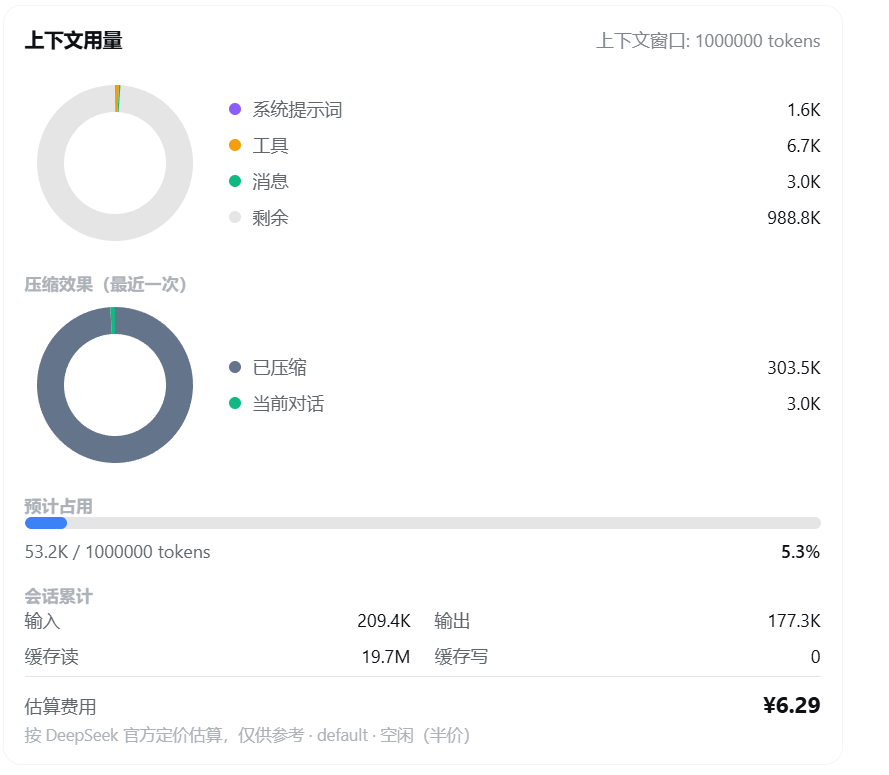
为 DeepSeek Harness 提供 /context 斜杠命令,用环形图实时展示当前上下文 token 用量与分配。对话区右侧还常驻一张迷你悬浮卡,实时显示占用率与估算费用,可拖动、可收起。
安装
npx @deepseek-ai/dsh plugin --profile web add github:GooodWei/context-vista
npx @deepseek-ai/dsh web
需先安装 pnpm(
dsh plugin add内部会调用它)。已全局安装 dsh 时,npx @deepseek-ai/dsh可简写为dsh。
使用
输入 /context 回车,展示一张卡片:上下文组成环形图(系统 / 工具 / 消息 / 剩余)、占用进度条、会话累计与估算费用。
右侧的迷你环形图悬浮卡实时更新、无需输入命令;按住标题栏可上下拖动(位置自动记忆),点右上角箭头可收起/展开。悬浮卡底部还有「压缩上下文」按钮,点击即触发 /compact(效果等同输入命令),压缩进行中会显示「压缩中…」并禁用。
自定义定价
内置 DeepSeek 官方定价(人民币 ¥,含峰谷)。要覆盖或新增,编辑 ~/.dsh/settings.yaml(热加载,无需重启)。货币单位与峰谷定义都跟随 API(路由),每个路由可各自指定。
最简示例
context-vista:
  pricing:
    "https://api.deepseek.com":
      models:
        deepseek-v4-pro:
          peak:    { hit: 0.3, miss: 9, output: 27 }
          offpeak: { hit: 0.15, miss: 4.5, output: 13.5 }
完整示例(DeepSeek ¥ + OpenAI $,标注全部键值对)
context-vista:
  pricing:                                  # 定价表:外层键 = 路由名 或 baseURL
    "https://api.deepseek.com":             # 路由①:DeepSeek,人民币 + 北京时间峰谷
      currency: "¥"                         #   本 API 的计价货币单位(省略默认 "¥")
      timezone: 8                           #   峰谷时段所在时区(UTC 偏移;省略默认 8)
      peakWindows:                          #   高峰窗口,HH:MM,含起点不含终点;start > end 表示跨午夜
        - start: "09:00"                    #     高峰起点
          end: "12:00"                      #     高峰终点
        - start: "14:00"                    #     第二段高峰起点
          end: "18:00"                      #     第二段高峰终点
      models:                               #   本 API 下的模型(必填)
        deepseek-v4-pro:                    #     模型名
          peak:                             #       写法一(峰谷分档)· 高峰价
            hit: 0.3                        #         输入 · 命中缓存,每百万 tokens
            miss: 9                         #         输入 · 未命中缓存,每百万 tokens
            output: 27                      #         输出,每百万 tokens
          offpeak:                          #       空闲价
            hit: 0.15                       #         输入 · 命中缓存
            miss: 4.5                       #         输入 · 未命中缓存
            output: 13.5                    #         输出

    "https://api.openai.com/v1":            # 路由②:OpenAI(ChatGPT),美元 + 无峰谷
      currency: "$"                         #   本 API 的计价货币单位
      models:                               #   无 timezone/peakWindows → 直接走平坦价
        "gpt-5.5":                          #     模型名
          hit: 2.5                          #       输入 · 命中缓存,每百万 tokens
          miss: 10                          #       输入 · 未命中缓存,每百万 tokens
          output: 30                        #       输出,每百万 tokens
价格为每百万 tokens 的单价,按各 API 实际币种填写;
currency只控制显示符号、不换算汇率;无峰谷的 API 省略timezone/peakWindows即可。上表数字仅示意。
- 外层键可用 provider 路由名(如
deepseek-official)或 baseURL(含:需加引号)。 - 每个路由可带
currency/timezone/peakWindows(各自覆盖全局默认),models为必填。 - 模型价格条目二选一:平坦
{ hit, miss, output },或峰谷{ peak, offpeak }。 - 支持
*作为路由名或模型名的通配符。 - 未匹配到的模型按内置默认(模型名含
flash走 flash 档,否则 pro 档)。 - 金额仅为估算,非账单。
License
MIT
Install
Install the catalog once, then DeepSeek Harness can find and install any plugin from this site automatically:
dsh plugin add dshbase-catalogThen say "install context-vista for me" — your agent finds it in the directory and installs it. Docs: dshbase-catalog · verified packs.
Web profile:
dsh plugin --profile web add context-vistaHeadless (CLI) profile:
dsh plugin --profile headless add context-vistaPackage
npm: context-vista · version 0.1.0 · tested on dsh 0.1.0-rc.6
Test report
Verified end-to-end: L1 install + L2 load + L3 runtime Q&A on dsh 0.1.0-rc.6.
When to use it
Give the agent a memory, a knowledge base, or a retrieval layer so it stops forgetting context between sessions.
Who it's for
Users running long projects who want the agent to remember decisions, docs, and preferences without re-explaining.
For developers — extending it
The memory/retrieval backend is the seam — plug a new store, tune what gets distilled, or add citation and audit trails.
Share this badge
Drop this badge into your README — it links back here and updates automatically when our test status changes:

[](https://dshbase.com/plugins/context-vista/)<a href="https://dshbase.com/plugins/context-vista/"><img src="https://dshbase.com/badges/context-vista.svg" alt="dshbase install-tested"></a>